🎉 Calla - Delivery & Pickup Date is available now on Shopify app store

Shopify app store


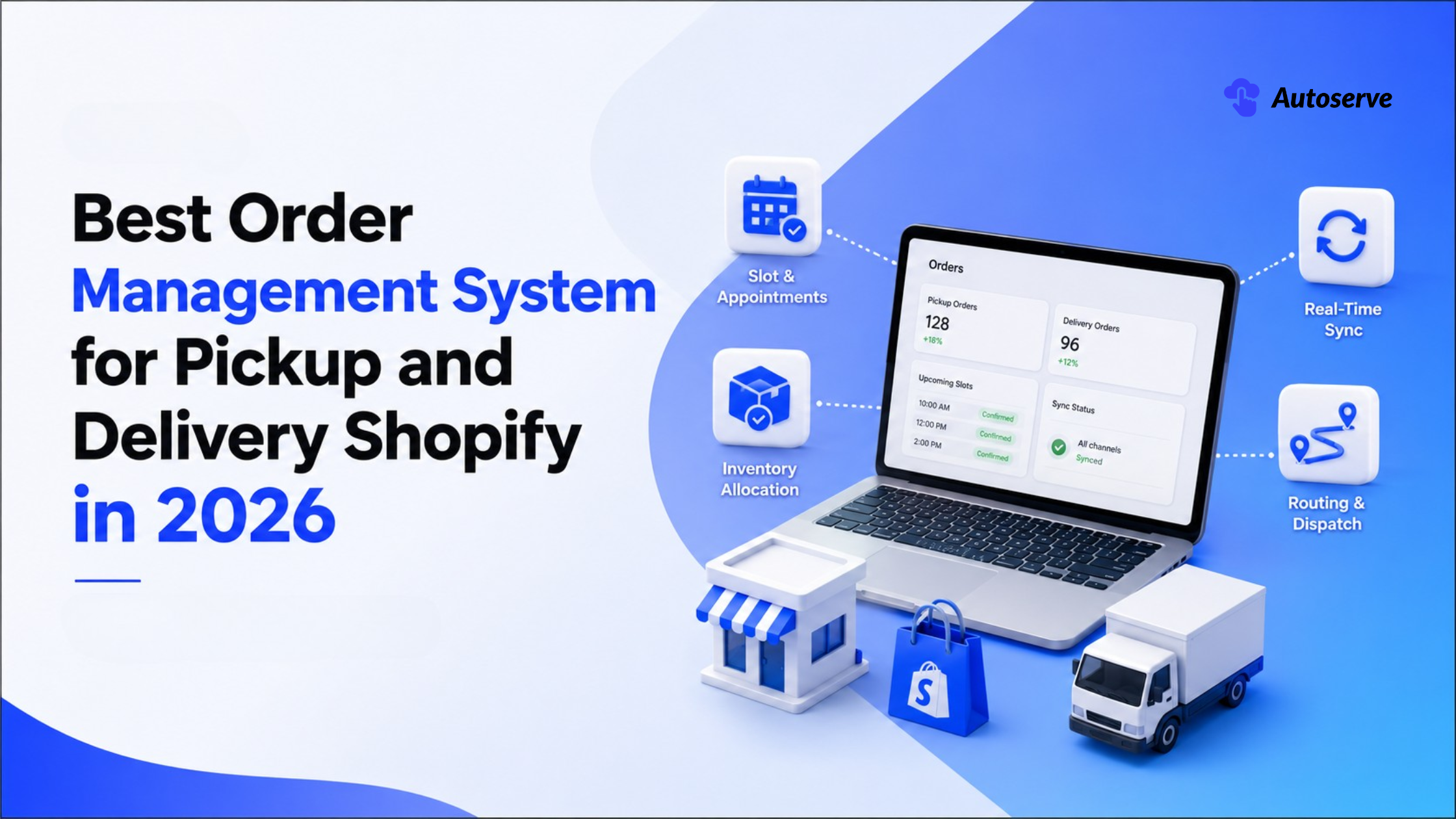
It is 4:55 p.m. on a Friday. Two customers arrive for the same cake. Your phone is buzzing with a delivery driver who is lost. And the "in stock" bouquet you just sold out an hour ago. Sound familiar?
If you run a bakery, a flower shop, a fresh-meat supply business, or a rental service, this chaos is not a staffing problem. It is a systems problem. Every missed pickup, double-booked slot, and oversold item is money walking out the door. Worse, it is a customer who will not come back.
Here is the good news. The right order management system turns that Friday panic into a calm, printed run sheet. This guide shows you exactly what to look for, how to compare options, and what real results look like. No fluff. No jargon. Just the buyer's roadmap that competitors leave out.

The best order management system for pickup and delivery is software that captures every order, holds a specific pickup or delivery time, and keeps your inventory accurate across all channels. In plain terms, it is the "command center" that tells you who ordered what, and when they are coming to collect it.
For local businesses, one size does not fit all. The strongest choice depends on your product. A bakery needs same-day pickup slots. A florist needs delivery windows and delicate handling. A B2B meat supplier needs cold-chain timing and recurring accounts. A rental shop needs pickup and return tracking.
So there is no single "winner" for every shop. But the best systems share a short, non-negotiable shortlist. Look for these five things first:
• Slot and appointment scheduling for time-sensitive pickups and curbside.
• Real-time inventory synchronization so you never oversell a perishable item.
• Local delivery routing and dispatch for efficient last-mile trips.
• Inventory visibility across your website, marketplace, and in-store point of sale.
• Simple staff tools your weekend team can run with zero training.
Get those five right and you have your answer. Everything else is a bonus. The rest of this guide helps you weigh each feature against your real needs, your budget, and your growth plans.
An order management system (OMS) is the bridge between "order placed" and "order collected." It receives orders from every channel. Then it assigns each one a pickup slot, a delivery window, or a route. Finally, it deducts stock in real time so your available quantity stays honest.
Think of it as air-traffic control for your orders. Without it, orders live in scattered places: a website, a spreadsheet, a notepad by the register, and three text threads. Mistakes hide in those gaps. Research shows fragmented tools can cut inventory visibility by up to 40%.
A good OMS closes those gaps. It gives customers a date-and-time picker at checkout. It sets cutoff times and blackout dates so no one books a slot you cannot fill. It shows staff a clear dashboard, sorted by pickup or delivery date. And it updates stock the moment an item sells, on every channel at once.
The result is fewer errors, fewer angry calls, and calmer staff. You stop reacting to problems. You start running a schedule.
Before you shortlist any tool, run it through a feature test. Buyers who skip this step often pay for software that looks great in a demo but fails on a busy Saturday. The features below are the ones that separate a real pickup-and-delivery OMS from a generic order tracker.
Here is a quick comparison of the four features that matter most, and why each one protects your revenue:

Do not chase the longest feature list. Chase the four features that match how your orders actually flow. A florist may live and die by delivery windows. A rental shop may care most about return tracking. Match the tool to your workflow, not the other way around.
Slot and appointment management lets your customer choose when they collect an order. They pick a date, a time window, or a curbside slot at checkout. Your staff then sees a clean, time-ordered list of what to prepare and when.
This feature is essential for perishable and made-to-order goods. A birthday cake is worthless a day late. A bouquet must be fresh at the door. Slot-based scheduling matches production to pickup time, so nothing sits and spoils.
Good slot tools also add guardrails. You can set cutoff times, so no one orders a same-day cake at 4:58 p.m. You can set blackout dates for holidays you are closed. And you can cap orders per slot, so your team is never buried at once.
Customers love the control, too. Nearly all curbside orders are ready within eight minutes of arrival when slots are managed well. That speed is the whole promise of pickup. Slot management is how you keep it.
Real-time inventory synchronization means your stock count updates the instant an item sells, everywhere at once. Sell the last dozen croissants on your website, and your marketplace listing drops to zero, too. No lag. No double sale.
This matters most for perishables and limited runs. You cannot "back-order" a fresh crab or a wedding bouquet. Oversell it, and you must cancel, refund, and apologize. That is a lost sale and a lost customer.
The scale of this problem is huge. Out-of-stocks and overselling cost retailers roughly $1.2 trillion in lost sales each year. And about 69% of online shoppers will abandon you for a competitor when an item is unavailable.
The fix is push-based sync, not slow polling. Businesses using automated, real-time inventory tools cut stock-outs by about 30% and improve stock accuracy by roughly 35%. For a perishable shop, that is the difference between a smooth day and a refund pile.
Inventory allocation reserves stock for a specific order the moment it is placed. Inventory visibility shows the true, live quantity you can still sell. Together, they stop the "phantom stock" problem that quietly drains revenue.
Here is why this is urgent. The average U.S. retailer runs at just 65% inventory accuracy. That means one in three records is wrong. For a multi-channel shop, that gap is where oversells and cancellations are born.
Allocation solves it by "locking" units to an order. If three customers buy the last three cakes, allocation assigns one cake to each. No fourth customer can grab a cake that is already spoken for. The count reflects reality, not guesswork.
Visibility then keeps every channel honest. Your website, your marketplace, and your in-store point of sale all read from the same live number. This unified view is the backbone of reliable multi-channel commerce. It is also what lets you scale without the chaos growing with you.
Routing and dispatch features plan the most efficient path for local delivery. Instead of a driver guessing the order of stops, the system builds a smart route. That saves fuel, time, and late arrivals.
Strong dispatch tools group nearby orders together. They respect delivery windows, so the 10 a.m. bouquet does not arrive at noon. And they often include a driver mobile app, so your team gets stops, addresses, and proof-of-delivery on their phone.
This is where speed becomes a competitive edge. Fulfillment latency and routing efficiency decide whether same-day delivery is a promise or a headache. A tight route means more orders per driver, per hour. That is pure labor optimization in fulfillment.
Not every shop needs full routing, though. If 90% of your orders are pickup, a heavy dispatch module may be overkill. Buy for the channel you actually run. We will return to this "do not overbuy" point later, because it saves local shops real money.
Features tell you what a tool can do. Attributes tell you how well it will hold up in your shop. Smart buyers score every option against five root attributes: reliability, speed, scalability, cost, and support. Most competitor articles skip this framework. That is exactly why it gives you an edge.
Use this simple scorecard when you compare vendors. Rate each one from 1 (poor) to 5 (excellent), then total the score:
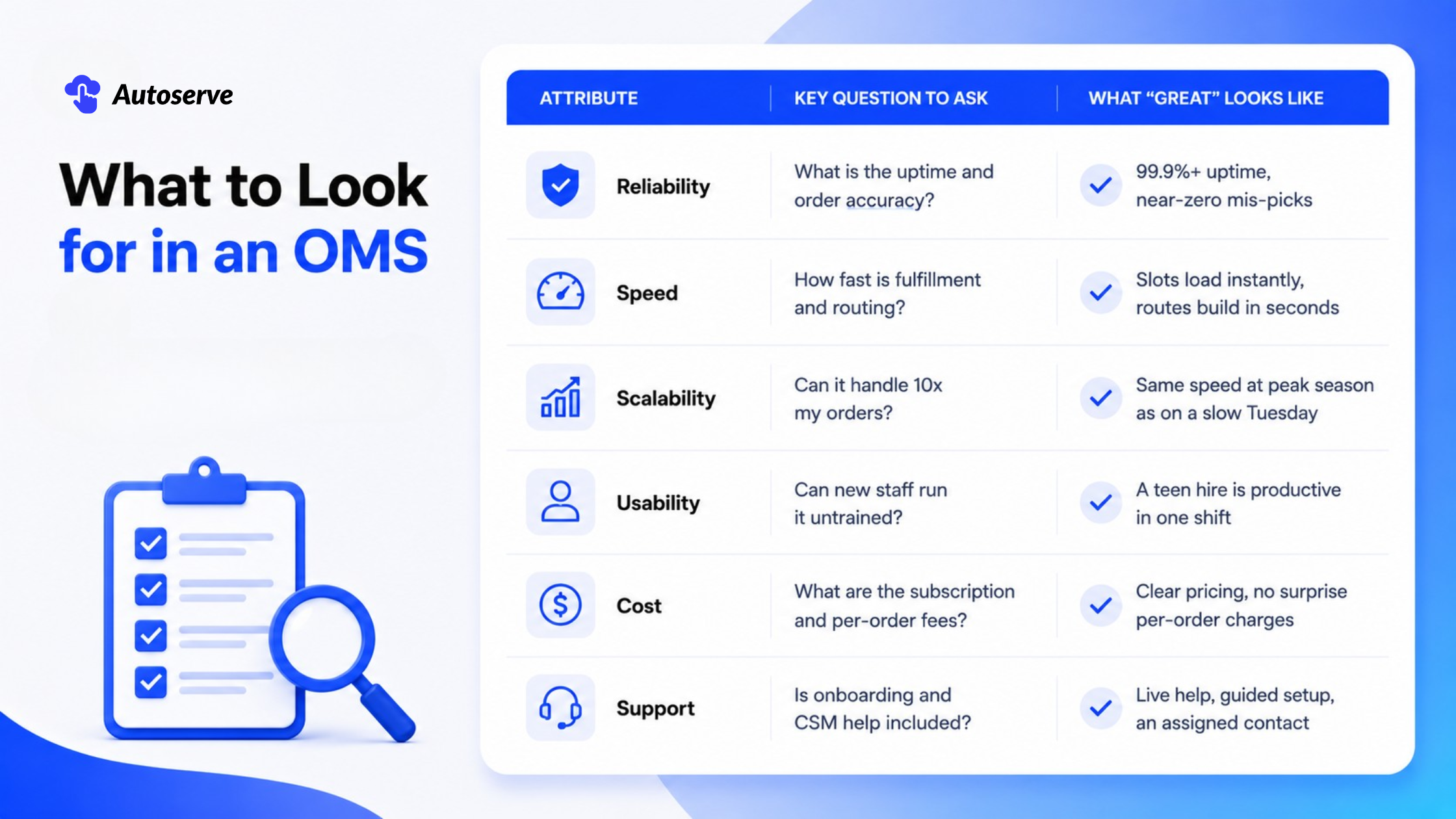
Score honestly, and the winner usually reveals itself. A tool can be dazzling and still fail on usability or cost. The framework keeps you focused on outcomes, not sales pitches.
Reliability has two parts: uptime and order accuracy. Uptime is how often the software is up and working. Order accuracy is how often the right order reaches the right customer, on time and complete.
Ask vendors for a specific uptime figure. Aim for 99.9% or higher. Anything less means the system could be down during your busiest hour. For a Saturday-morning bakery rush, downtime is not an inconvenience. It is lost revenue.
Order accuracy is the deeper test. In the industry, this is close to the "perfect order rate," which counts orders delivered on time, complete, and damage-free. A reliable OMS lifts this rate by cutting the human errors that cause mis-picks and wrong hand-offs.
Why does this matter so much? Because a single wrong order breaks trust. A reliable system, backed by allocation and clear staff dashboards, makes accuracy the default. You want a tool that makes the right outcome the easy outcome.
Speed is about how fast an order moves from "placed" to "in the customer's hands." Two things drive it: fulfillment latency and routing efficiency. Both should feel instant to staff and customers alike.
Fulfillment latency is the delay between an order arriving and your team acting on it. A fast OMS pushes new orders to a live dashboard right away. Staff prep sooner. Nothing waits in a queue nobody is watching.
Routing efficiency is about delivery. A quick, smart route means more stops in less time. That directly cuts labor cost and late arrivals. It also lets you offer same-day windows without burning out your driver.
Test speed in the demo, not the brochure. Load a busy day. Add many orders. Build a route. Watch how the screen responds. If it lags during a calm demo, it will crawl during your holiday peak. Speed you cannot see under pressure is not speed you can trust.
Scalability and usability are the two attributes owners underrate the most. Scalability means the tool keeps working as your orders grow from 20 a day to 200. Usability means your staff can run it without a training manual.
Test scalability by asking about peak load. Holidays are brutal for pickup shops. Search interest and orders spike hard in November and December. A system that is smooth in July but frozen on December 23 will cost you your best sales days.
Usability is just as critical, and here is a bold truth: the best OMS is not the one with the most features. It is the one your weekend hire can run in a single shift. Complex software that needs a specialist is a hidden cost, not a benefit.
So watch a real, non-technical person use it. Can they add an order, change a slot, and reprint a label without help? If yes, you have found a tool that scales with your team, not against it. Simple wins. Every time.
Cost is more than the sticker price. You must look at two layers: the subscription fee and the per-order fee. A low monthly price can hide a per-order charge that punishes you for growing. Read the pricing page slowly.
Ask three blunt questions. What is the flat monthly cost? Is there a fee per transaction or per order? And are there charges for extra locations, users, or channels? The answers reveal the true cost at your volume, not the sample volume in the ad.
Support is the other half of value. Great software with no help is a trap. Look for guided implementation, live onboarding, and an assigned customer success manager (CSM). These reduce your setup time and your risk.
Many small-business tools include a free trial, often around 30 days with no card required, so you can test before you commit. Use that window fully. A tool that earns your trust in the trial is a tool worth paying for.
Here is the content gap almost every competitor ignores: your industry changes the answer. A generic "top 10 OMS" list will not tell a florist what a butcher needs. This section fixes that. Below is a vertical-by-vertical guide for the four business types most likely to search for this tool.
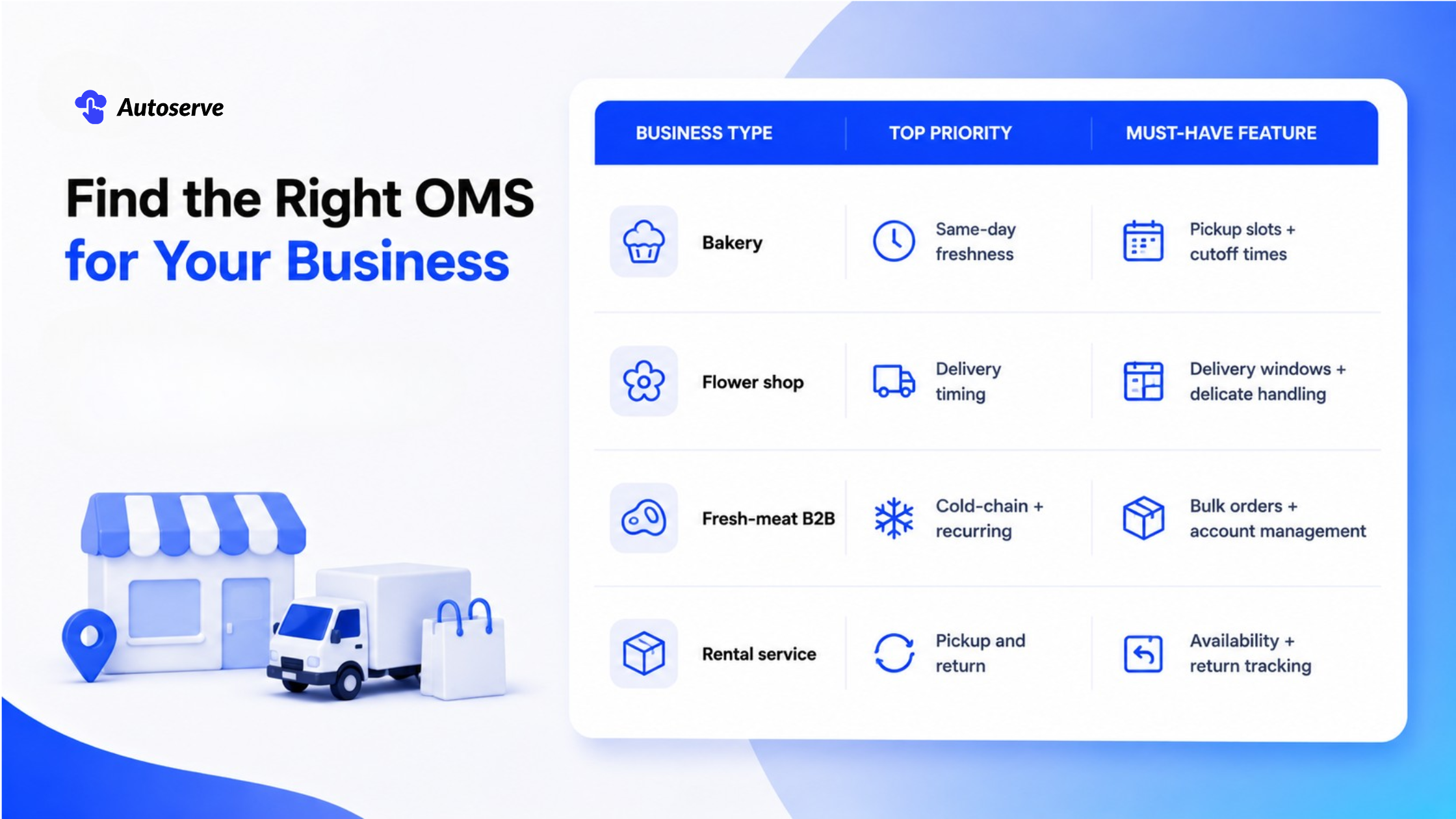
Match the tool to your trade. The right feature set for your vertical beats a longer feature list every time.
For bakeries, freshness is the entire product. A cake ordered for a 2 p.m. party must be ready at 2 p.m., not baked at dawn and left to dry. So the best bakery OMS is built around pickup slots and cutoff times.
Look for slot-based scheduling first. It lets customers reserve a pickup window. Your team then bakes to that schedule, so nothing sits too long. Cutoff times stop last-minute same-day orders you cannot physically fulfill.
Blackout dates matter, too. Close for a holiday, and the calendar should block those dates automatically. Order caps per slot keep your ovens and staff from being overwhelmed at one time.
Finally, choose a clear, date-sorted dashboard. Your team should glance at one screen and know the day's run: this cake at 10 a.m., that order at noon. That simple view is what turns a frantic morning into a calm, on time one.
Flower shops live at the crossroads of pickup and delivery. Blooms are fragile and time-sensitive. So the best florist OMS focuses on delivery windows, careful routing, and clear handling notes.
Delivery windows come first. Customers often need flowers to arrive at a set time: before a funeral, during office hours, or ahead of a date. Your system should let them pick that window and let you honor it.
Routing efficiency protects the product. A tight, well-ordered route means less time in a hot van and fresher flowers at the door. Look for dispatch tools that respect windows and group nearby stops.
Handling details save deliveries. The best tools attach notes to each order: "leave with neighbor," "fragile vase," or "call on arrival." These small features prevent the delicate mistakes that lead to refunds. For flowers, presentation is the promise. Your OMS should protect it.
Fresh-meat B2B suppliers play a different game than retail shops. Their orders are large, cold-chain sensitive, and often repeated weekly. So the best OMS here handles bulk orders, recurring accounts, and tight delivery timing.
Cold-chain timing is the top concern. Meat must move fast, at temperature, on a reliable schedule. The system should lock delivery windows and build routes that keep transit short. A late drop is not just annoying. It is a food-safety risk.
Recurring account management is the second must-have. A restaurant client may order the same cuts every Monday. The best tools save these standing orders, so reordering takes seconds. That builds loyalty and cuts admin time.
Bulk pricing and account visibility round it out. B2B buyers expect per-account pricing and clear order history. A strong OMS supports both, so your wholesale relationships run smoothly. In this trade, reliability and repeat business are everything.
Rental services have a twist no retailer faces: the product comes back. A rented item is out, then returned, then rented again. So the best rental OMS tracks pickup, return, and real-time availability as one connected cycle.
Availability tracking is the core. The system must know an item is booked, out, or free, minute by minute. Double-booking a single rental unit is a fast way to lose two customers at once. Real-time visibility prevents it.
Return handling is just as vital. When an item comes back, availability should update instantly, so it can be rented again. A returned unit that stays "invisible" to your booking page is lost revenue sitting in the back room.
Slot scheduling ties it together. Both pickup and return need time windows, so your counter is never swamped. The right tool treats the whole loop as one flow. That keeps your fleet earning and your calendar honest.
Let's talk numbers, because this is an investment, not a toy. A pickup-and-delivery OMS pays for itself in three ways: fewer errors, lower labor cost, and more repeat customers. The data behind each is strong, and the market trend is firmly on your side.
First, the tailwind. U.S. click-and-collect sales reached about $154.3 billion in 2025. The wider U.S. BOPIS market was valued near $129 billion in 2024 and is forecast to grow at a 16.45% annual rate through 2033. Around 97 million Americans now use pickup regularly. This is not a fad. It is the new normal.
Now the payoff. And note the herd signal: about 87% of merchants already offer pickup as a core option. Waiting means falling behind peers your customers already shop with.
An OMS cuts errors by removing the human gaps where mistakes hide. When orders live in one place, allocated and time-sorted, staff stop guessing. The effect on both accuracy and labor is measurable.
Consider the baseline problem. The average retailer runs at 65% inventory. That inaccuracy fuels oversells, cancellations, and hours wasted fixing mistakes. Every wrong order costs you twice: the refund and the labor to sort it out.
Automation reverses this. Businesses using automated, real-time inventory tools reduce stock-outs by about 30% and lift accuracy by roughly 35%. Fewer stock-outs means fewer apologies and fewer refunds.
Labor savings follow close behind. Better inventory practices can return 5–10% of staff time otherwise lost to recounts and mis-picks. For a small team, that is hours back every week. Hours you can spend baking, arranging, or serving, instead of firefighting.
Picture a busy neighborhood bakery. Before adding slot scheduling, customers ordered by phone and email. Pickup times were vague: "sometime Saturday." The result was predictable. Cakes piled up. Some customers never showed. Others arrived together at the worst moment.
Then the bakery added a checkout date-and-time picker with cutoff times and order caps per slot. Customers now chose an exact pickup window. Staff saw a clean, time-ordered run sheet each morning.
Two things changed fast. First, missed pickups fell, because customers committed to a slot and got automatic reminders. Second, the morning rush smoothed out, because order caps spread demand across the day.
The broader pattern supports this. Well-managed pickup gets customers in and out fast, with nearly all curbside orders ready within eight minutes. Slot scheduling is the simple lever that makes that speed possible. For a bakery, it turns freshness from a hope into a schedule.
Here is a real example. BestCrawfish LLC runs a live seafood business. They sell live and boiled crawfish across the U.S. and offer local pickup in Houston, Texas. Their product is the definition of perishable and time-sensitive.
Before finding the right tool, they struggled. In fact, they tried three different apps that did not fit. Coordinating delivery dates meant contacting buyers one by one. That is slow, error-prone, and impossible to scale.
They adopted a date-and-time picker with blackout dates and cutoff times. The change was clear. Staff no longer had to call buyers to arrange delivery dates. Orders now sorted automatically by delivery date on a clean dashboard, and changes were easy to make.
The lesson generalizes to any perishable shop. Real-time scheduling and inventory control stop the overselling that plagues fresh goods, where oversells drive a big share of the $1.2 trillion lost to stock-outs each year. For live seafood, getting the date and the count right is the whole business.
Use this checklist to narrow the field fast. Score each tool against every line. The one that checks the most boxes for your trade is your shortlist leader.
• Slots & cutoffs: Does it offer pickup slots, delivery windows, and cutoff times?
• Real-time sync: Does stock update instantly across every channel?
• Your vertical: Does it fit bakery, florist, meat B2B, or rental needs?
• Reliability: Is uptime 99.9%+ with strong order accuracy?
• Usability: Can a new hire run it in one shift?
• Cost clarity: Are subscription and per-order fees clearly stated?
• Support: Is there guided onboarding and a real human to chat?
Keep your list to two or three finalists. Then run each through a real trial week. Do not decide from a demo alone. Decide from how the tool handles your busiest day. That is the only test that counts.
A smooth launch protects your revenue during the switch. The goal is simple: go live without dropping a single order. You do this by rolling out in stages, not all at once.
Start with a pilot. Turn the new system on for one channel or one product line first. Keep your old process running beside it for a week. This lets you catch issues while the stakes are low.
Then train your team on the basics only. Focus on the daily tasks: adding an order, changing a slot, reprinting a label, and reading the dashboard. Skip the advanced settings at first. A short, hands-on session beats a long manual every time.
Finally, pick a quiet week to fully switch over. Avoid holidays and peak seasons. Lean on your vendor's onboarding and CSM support during the cutover. A staged, well-timed go-live means your customers never feel the change. They just notice things running smoother.
Returns and exchanges are where many pickup workflows fall apart. A returned item that does not update your system becomes invisible stock. It sits in the back, unsellable, quietly draining revenue. Your OMS should prevent that.
Look for a tool that ties returns to inventory. When a pickup order is returned or exchanged, the system should restock the item automatically. That keeps your available count accurate and the product ready to resell.
Set a clear, simple policy, too. Define your return window, your condition rules, and your exchange steps. Then make sure staff can process a return in the system with a few clicks, not a paper form.
This is doubly important now. U.S. retail returns are running high, near 17% of sales. A clean returns flow protects both your inventory accuracy and your customer relationship. Handled well, a smooth return turns a frustrated buyer into a loyal one.
Imagine next Friday. Every order has a slot. Your driver has a clear route. Your stock counts are honest. No double-booked cakes. No lost drivers. No oversold bouquets. Just a calm, on-time close.
That is not a dream. It is what the right order management system does, starting on day one. And the window to act is now. Pickup and delivery are growing fast, orders spike hardest at the holidays, and 87% of your peers already offer it. The shops that set up early own the busy season. The ones that wait scramble through it.
You do not have to guess. You can test it, on your own orders, at low risk. Most tools offer a free trial, often around 30 days with no card required. Slots are busiest before peak season, so the best time to set up is before the rush, not during it.
How can the ROI calculator estimate your savings in minutes?
Not sure it is worth it? Let the numbers decide. An ROI calculator estimates your savings in minutes. You enter your order volume, your average value, and your current error rate. It returns your likely gains.
The math is compelling. Cutting stock-outs by ~30% and returning 5–10% of staff time adds up fast for a small shop. Run your numbers in the ROI calculator today, and see exactly what a better system is worth to your business.
1. Can a small business run pickup and delivery without a dedicated OMS?
Yes, at very low volume you can manage with a spreadsheet and a calendar. But once orders grow, errors and missed pickups multiply fast, and a dedicated OMS quickly pays for itself.
2. Does an OMS support curbside pickup and scheduled pickup slots by default?
Most modern pickup-and-delivery systems include curbside and scheduled pickup slots as standard, but always confirm before buying. Check that it also offers cutoff times, blackout dates, and order caps per slot.
3. What's the best order management system for perishable local delivery with same-day time windows?
The best choice offers real-time inventory sync, same-day delivery windows, and cutoff times to protect freshness. For live or fresh goods, prioritize a date-and-time picker with blackout dates, like the setup used by fresh-food sellers such as BestCrawfish.
We try to make easy and simple for every professionals. Get 30 days free trial - No credit card required.

