🎉 Calla - Delivery & Pickup Date is available now on Shopify app store

Shopify app store


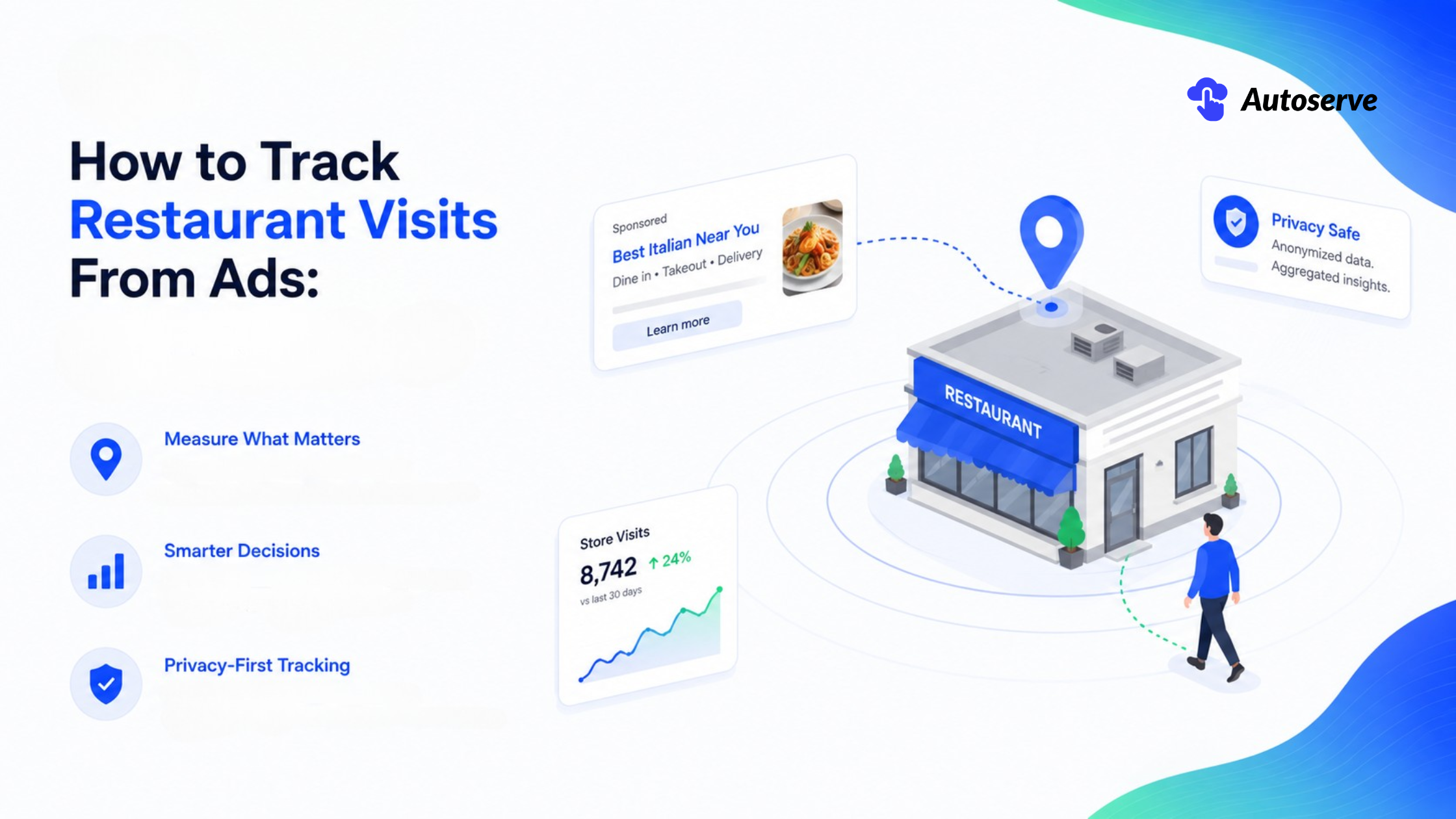
You boosted a post. You ran the Google ad. The dashboard lit up with clicks, likes, and impressions.
Then the manager asks the question that ruins your afternoon: "Okay… but did any of those people actually walk in?"
Silence. You don't know. Nobody knows. So the budget conversation turns into a guessing game, and next month you cut the wrong ad.
If that stings, you're not alone. Most restaurant owners are flying blind on the one metric that pays the bills: real people, at real tables, spending real money. The good news? That gap is finally closeable and you don't need a data science team to do it.
Yes. You can track restaurant visits from ads by combining platform tools (Google Ads Store Visits and Meta's Conversions API), low-tech attribution (QR codes, promo codes, reservation links), and offline conversion uploads from your POS. Together, these connect ad clicks to real foot traffic, so you can measure cost per visit and true ROI.
That's the short answer for the skimmers. Now let's make it real.
Think of ad attribution like a detective story. The "crime" is a happy customer eating your food. The clues are scattered a click here, a scanned QR code there, a timestamp on a receipt. No single clue solves the case. But stack them together, and the culprit ad becomes obvious.
Here's the mindset shift that matters: you will never track 100% of visits, and you shouldn't try. The goal isn't perfection. It's directional truth enough signal to know which ads earn their spend and which ones quietly bleed your budget.
A click is a maybe. A visit is a yes.
Between the two sits a huge, invisible gap. Someone taps your ad, gets distracted, and forgets. Or they screenshot your menu, drive over three days later, and pay in cash. Your ad platform sees the tap but never the table.
This is the online-to-offline attribution gap, and it's brutal for restaurants specifically. Unlike e-commerce, your "checkout" happens in a dining room, not a browser. There's no thank-you page to fire a pixel.
Vanity metrics make it worse. Likes and reach feel like progress. They trigger a little dopamine hit. But a viral reel with 50,000 views and zero attributed covers is a party nobody showed up to. Foot traffic not applause is the metric that keeps your lights on.
Offline conversion attribution is the process of matching a real-world action: a walk-in, a booking, a coupon redemption back to the specific ad that triggered it.
In plain English: it's proof. It answers "which ad put this butt in this seat?"
For a restaurant, the "conversion" is usually one of four things: a store visit (someone physically arrives), a reservation, a phone order, or an in-store purchase logged at your POS. Attribution links each one to a click, a scan, or an impression.
The catch is matching. Platforms need a shared identifier a location signal, a hashed email, a coupon code, a timestamp to connect the two worlds. No shared clue, no match. Most of this guide is really about manufacturing those clues so the match can happen.
Start with the three numbers that actually mean something. Everything else is noise.
You're measuring three things: cost per visit (what you paid to get someone through the door), revenue per visit (what they spent once inside), and cost per incremental visit (visits you got only because of the ad not ones who'd have come anyway).
That last one is the secret weapon most owners ignore. More on it below, because it's where the real money hides.
Before you obsess over tools, get your logic straight. A tracking system is only as good as the question it answers. And the question is never "how many likes?" It's "for every $100 I spend, how many extra guests arrive, and how much do they spend?".
Three formulas. Memorize them.
• Cost per visit = Ad spend ÷ attributed visits. If you spent $500 and tracked 250 visits, that's $2 per visit. Compare it to your average profit per guest to know if it's worth it.
• Revenue per visit = Total attributed revenue ÷ attributed visits. This tells you if an ad brings high spenders or just deal hunters.
• Cost per incremental visit = Ad spend ÷ extra visits caused by the ad. This strips out the loyal regulars who'd have come anyway.
Here's the trap almost everyone falls into. Your Tuesday regular sees your ad, clicks it, and comes in like she does every Tuesday. Your dashboard proudly claims credit. But you didn't earn that visit. You paid to reach someone already coming.
Incrementality fixes this. Run a geo holdout: advertise in one neighborhood, go dark in a similar one, and compare foot traffic. The difference is your true lift. It's the closest thing to honesty in ad measurement.
An attribution window is the time limit for giving an ad credit. See the ad Monday, visit Thursday was the ad responsible?
Windows decide. Google Ads typically attributes a store visit to the date of the ad interaction, not the date of the visit. So a Saturday walk-in from a Friday click shows up in Friday's report. That quirk confuses a lot of owners staring at "closed-day" conversions.
Meta's offline attribution window runs 28 days longer than the standard 7-day pixel window. That's generous, and for good reason. Restaurant decisions aren't instant. People bookmark, forget, and return when the craving hits.
The lesson: pick a window that matches how people actually choose where to eat. A slow-decision special-occasion restaurant needs a longer window than a lunch-rush taco spot. Match the tool to the human behavior, not the other way around.
Not every method fits every restaurant. Here's the decision tree competitors skip.
• Single location, low tech, busy street? Start with QR codes + promo codes. Then apply for Google Store Visits foot traffic, not spend, drives eligibility.
• Single location, quiet area, low natural footfall? Store Visits may never qualify. Lean hard on coupon codes and reservation links instead.
• Modern POS (Square, Toast, Lightspeed)? Add offline conversion uploads. Your POS becomes your best attribution tool.
• Multiple locations / franchise? Layer Store Visits + POS uploads + a centralized reporting sheet. Scaling section below is built for you.
Follow the path that matches your reality. Copying a big chain's stack when you're a single bistro just burns time you don't have.

Google's Store Visits is the closest thing to magic here and the most misunderstood.
Here's how it works. When someone clicks or views your ad, then later shows up at your restaurant, Google matches it using anonymized GPS and location-history signals from users who opted in. It then models the total, filling in the users it can't see directly. The result appears as a Store Visits conversion in your account.
Crucially, this data is modeled and aggregated never a list of named individuals. Google built it that way on purpose, to protect privacy and pass its own thresholds. You get estimates, not spreadsheets of customers.
The counter-intuitive truth: eligibility depends on your street, not your spend. Google's own docs are deliberately vague, but the pattern is clear. A busy high-street café spending a few hundred dollars a month can qualify in weeks. A restaurant on a quiet industrial estate spending $10,000+ can wait months or never qualify simply because there isn't enough foot-traffic data to keep it anonymous. Location beats budget.
Store Visits runs on a foundation. Build it in this order.
1. Verify your Google Business Profile. Every location, fully verified. This is the source of your address data. No verified profile, no store visits full stop.
2. Link your Business Profile to Google Ads. This connects your locations to your campaigns.
3. Enable location assets (formerly location extensions) on every campaign. Campaigns that opt out are invisible to Store Visits reporting.
4. Run Performance Max for store goals if you can. It's Google's successor to Local campaigns and optimizes across Search, Maps, YouTube, and Discover to drive local actions.
Even before you're eligible for full Store Visits, you'll capture valuable proxy signals: direction requests, calls, and Maps clicks. These aren't perfect, but they're real intent signals someone asking their phone how to drive to you is halfway out the door already.
Complete every profile field: hours, photos, menu link, category. Incomplete profiles quietly reduce eligibility. Details matter more than you'd think.
Three words that trip everyone up. Let's untangle them.
• Modeled means estimated. Google can only directly see visits from location-history users. It uses that sample plus AI to project the full number. So your Store Visits figure is a smart estimate, not a headcount.
• Aggregated means grouped. You see "212 visits this week," never "Maria visited Tuesday at 7pm." Individuals are blended together on purpose.
• Privacy-safe means Google won't report anything that could re-identify a person. If your volume is too low to stay anonymous, you get nothing. That's the real reason for the eligibility gate.
Why care? Because modeled data is always underreported. It only "sees" a slice of reality. So treat Store Visits as a trend line, not a precise ledger. Rising is good. Chasing the exact number is a waste of energy.
Meta changed the rules in 2025, and a lot of stale guides haven't caught up. Here's the current reality.
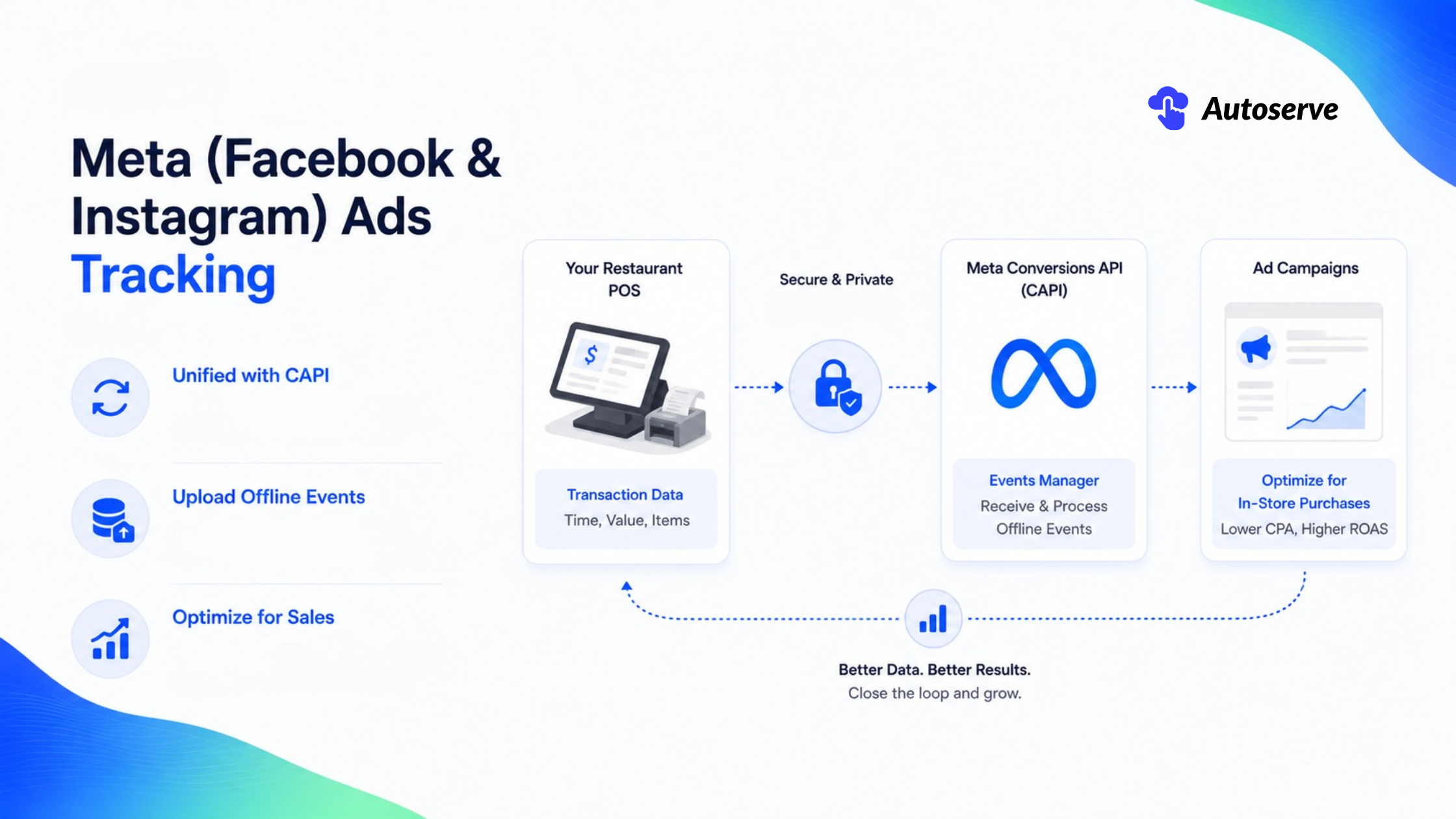
The big 2026 update: Meta discontinued the standalone Offline Conversions API in May 2025. Everything now flows through the unified Conversions API (CAPI). If a blog tells you to set up "offline event sets" the old way, it's out of date. This is where staying current gives you an edge competitors don't have.
Meta offers two paths to link ads to visits. First, a Store Traffic campaign, which shows modeled visit estimates but you often need a Meta rep to whitelist your business account, and it optimizes for reach, not visits directly. Second, and more powerful, offline events via CAPI, where you upload real transaction data to match against ad exposure.
For most restaurants, CAPI offline events win. They feed Meta's algorithm actual buyers, which sharpens targeting and builds better lookalike audiences from your real customers.
The modern setup lives inside Events Manager → Datasets. Here's the flow.
1. Create or open a dataset in Events Manager. This is your central hub for web, app, and in-store events.
2. Send offline events via CAPI with the action_source set to physical_store. This tells Meta the event happened in your restaurant.
3. Include the right fields: event timestamp, order value, and hashed customer identifiers (email or phone, SHA-256 hashed always).
4. Upload within 62 days of the transaction. Meta recommends daily or real-time uploads for the best optimization.
Once events flow in, you can optimize campaigns toward in-store purchases far more powerful than optimizing for clicks. You're now telling Meta "find me more people like the ones who actually paid," not "find me more people who tap ads."
If you're not technical, a server-side connector (like a CAPI Gateway or server-side GTM) can automate the whole pipeline. Set it once, forget it.
Yes and it's the most underrated tactic for small restaurants.
A QR code inside your Instagram ad creative is a trackable bridge from feed to table. Someone sees your dish, scans, lands on a page with a coupon, and redeems it in-store. Every step is countable. No modeling, no eligibility thresholds, no rep required.
Put a unique code per campaign. Your "Reels ad" code and your "Stories ad" code should differ. Now you know exactly which creative drove the scan and the visit.
The honest limitation: not everyone scans. QR attribution captures the motivated slice, not the total. But that slice is directly measurable a real receipt tied to a real ad which is worth more than a fuzzy estimate. Use it as your ground-truth check against modeled platform data.
Here's the pattern interrupt that saves small restaurants: your cheapest tools are often your most accurate.
Platform modeling is fancy but fuzzy. A coupon code redeemed at the register is a hard fact. For a single-location spot, a $0 promo code can out-measure a $10,000 ad platform. Don't let "advanced" intimidate you out of "accurate."
These methods share one superpower: they force a shared identifier into the customer's hands. That identifier is the clue that closes your detective case.
Make the code do double duty drive the action and record the source.
• Generate a unique QR code per campaign and channel. Instagram gets one, Google gets another, your printed flyer a third.
• Point it to a dedicated landing page with a clear offer a free appetizer, 15% off, a secret menu item. Mobile-friendly, one tap, no friction.
• Capture the source with a UTM tag on the URL, so the scan lands in your analytics with its origin attached.
• Tie redemption to the visit by having staff scan or key the code at checkout.
Now the loop is closed: ad → scan → landing page → in-store redemption. Every link is logged. That's cleaner attribution than most Fortune 500 companies manage.
A promo code is attribution disguised as a discount.
Give each ad campaign its own code INSTA20, GOOGLE10, FLYER5. When a guest says the code at the register, your POS logs it against that exact campaign. No GPS, no modeling, no eligibility gate. Just a word and a receipt.
The metric that matters here is redemption rate: the percentage of issued codes actually used in-store. High redemption means your ad reached hungry, ready-to-visit people. Low redemption means the creative got attention but not appetite.
Redemption data is gold for one more reason it captures the cash payers and walk-ins that digital tracking misses entirely. That old-school couple who never clicks anything? They still said "GOOGLE10" at the counter. Now they're in your data.
Two more clues, hiding in plain sight.
Reservation links tag every booking with its source. Route your Instagram ad to a unique reservation URL, and each table booked through it traces straight back to that ad. For reservation-heavy restaurants, this is your single cleanest signal.
Call tracking assigns a unique phone number to each campaign. Someone calls the number from your Google ad, and the call plus its duration and outcome is logged against that campaign. Perfect for phone orders and "do you have a table tonight?" calls.
Together, reservations and calls cover the guests who convert before arriving. Layer them on top of QR and promo codes, and suddenly you're catching visitors across every path they take to your door.
Now for the payoff turning all this tracking into a budget decision you can defend.
ROI isn't complicated. It's revenue you earned versus money you spent, per method. The art is comparing methods fairly, because each trades accuracy for effort differently.
Plug your real numbers into these. That's your whole ROI engine.
• Cost per visit = Ad spend ÷ attributed visits
• Revenue per visit = Attributed revenue ÷ attributed visits
• Return on ad spend (ROAS) = Attributed revenue ÷ ad spend
• Cost per incremental visit = Ad spend ÷ visits caused only by the ad (from your geo holdout)
• Cost per visit: $600 ÷ 200 = $3.00
• Revenue per visit: $28
• ROAS: $5,600 ÷ $600 = 9.3x
Even if half those guests would have come anyway, the incremental ROAS still clears 4x. That's a campaign you scale, not cut. Numbers end the argument.
There's no single best method — only the best fit. Here's the honest comparison competitors won't give you straight.
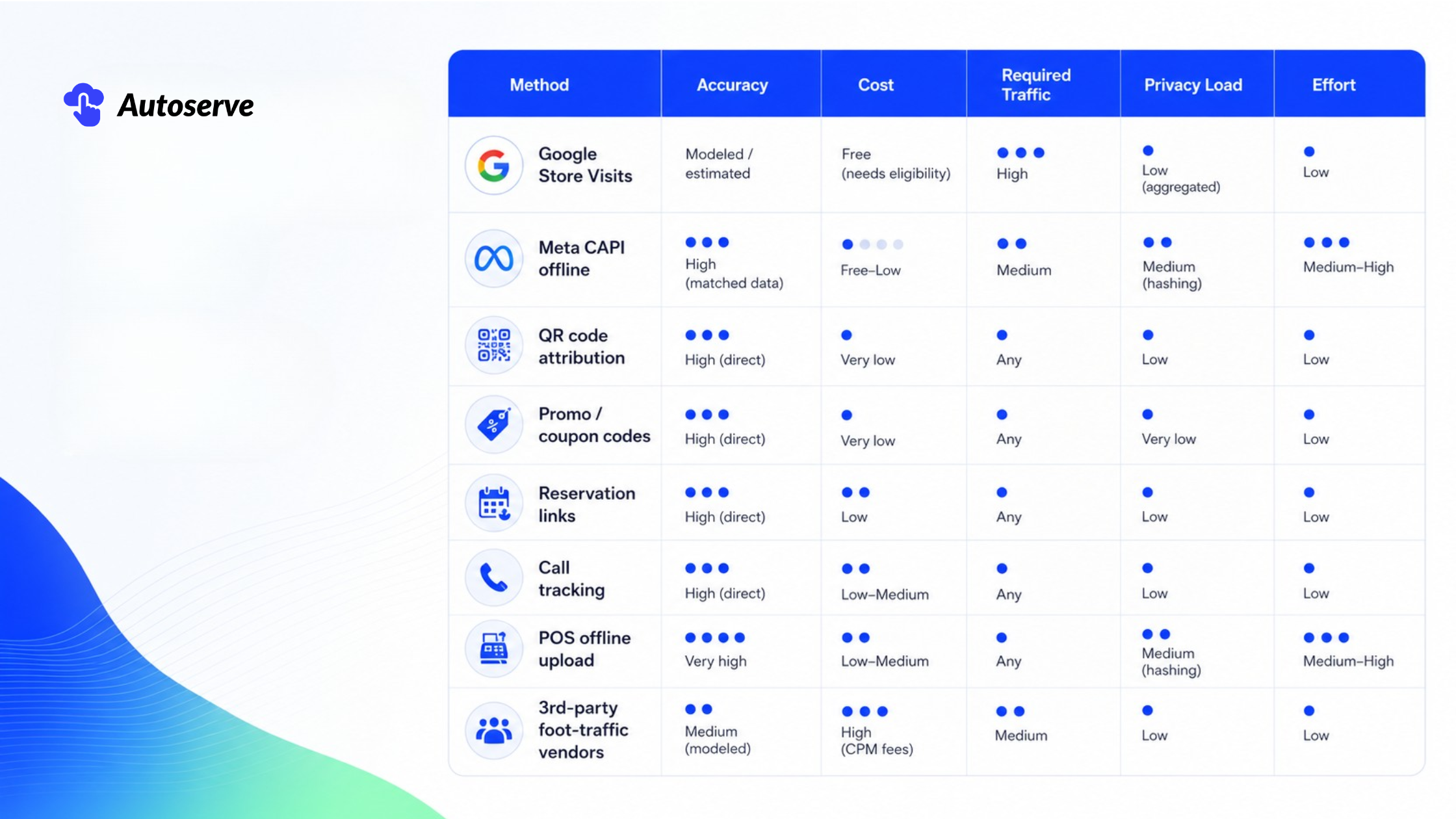
The takeaway: small and single-location? Start bottom-heavy codes, QR, reservations. Big or multi-location with eligibility? Layer platform modeling on top. Never rely on one method alone; each covers the others' blind spots.
Here's the content gap nobody fills: multi-location tracking is a different sport. What works for one bistro breaks across twelve franchises with three different POS systems.
The core challenge is mapping. Every location needs its own Google store ID, its own verified profile, and a clean line back to the right campaign. Get the mapping wrong and your reports become mush.
Consistency is everything at scale. Do this before you launch a single ad.
• Verify every location in one central Business Profile account. All of them. No stragglers.
• Map each Google store ID to the correct location asset and campaign. A spreadsheet linking store ID → address → campaign → POS keeps you sane.
• Standardize identifiers across POS systems. If Location A uses Toast and Location B uses Square, agree on one common data format (timestamp, order value, hashed email) so uploads merge cleanly.
• Use a manager account in Google Ads so store visits deduplicate across child accounts instead of double-counting.
Different POS systems are the silent killer of franchise attribution. Force them into a shared CSV shape early, or you'll fight mismatched data forever.
Franchises live with a tension: brands want one dashboard, locations want local control. You can have both.
Run local campaigns per location local offers, local creative, local radius targeting because a taco truth in Austin isn't the same as one in Boston. But pipe every location's results into one central reporting layer.
A simple stack: each location tracks its own visits and codes, all data flows into a shared warehouse or a connected dashboard (even a well-built Google Sheet works to start), and HQ sees the roll-up while managers see their store. Local autonomy, central visibility. That balance is what most franchise guides completely miss.
Tracking visits means touching location and customer data. Do it carelessly and you trade a marketing win for a legal headache. This section is your insurance.
The reassuring news: the mainstream methods are built to be privacy-safe by design. Google's Store Visits is aggregated and modeled precisely so no individual is identifiable. Meta requires hashing. Your job is to respect the guardrails, not build new ones.
A few principles cover most of it.
• Location data is consent-based. Google's store-visit modeling leans on users who opted into location history. You never see individuals only aggregates.
• Hash everything personal. Emails and phones must be SHA-256 hashed before upload to Google or Meta. This protects the customer and is required.
• Honor local law. Depending on your region (GDPR, CCPA, and similar), you may need clear notice and consent for collecting emails, phones, or loyalty data.
• Collect only what you'll use. More data is more liability. Grab the identifiers that drive matching and nothing extra.
When in doubt, add a short line to your loyalty signup and receipts explaining how data is used. Transparency is cheap insurance.
Here's the truth no software vendor will tell you: your best tracking tool is your server, not your dashboard. All the tech in the world fails if the person at the register doesn't ask for the code.
Attribution happens in a two-second human moment. Nail that moment and your data comes alive. Miss it and your fancy pipeline sits empty.
Give your team a script so short they can't forget it.
• At greeting: "Did you find us through an offer today?"
• At the register: "Any code or coupon to add before I total this?"
• On the receipt prompt: "Want your receipt texted or emailed?" (quietly captures an identifier)
Make it a habit, not a task. Add a code field to your POS checkout flow so it's the natural next step, not an interruption. Reward the shift that logs the most codes a little friendly competition drives capture rates fast.
For reservations, train hosts to confirm the source: "Booked through Instagram? Great, you're all set." One sentence, and you've tagged the visit.
Speed and data can coexist if you design for the rush.
Keep the ask to one question, one field. Anything longer dies during a Friday-night slam. Bake code entry into the existing checkout tap so it adds zero steps. Pre-load your top campaign codes as one-tap buttons on the POS.
The golden rule: if it slows the line, it won't survive. Test your workflow during your busiest hour, not a quiet Tuesday. If a new server can do it without thinking after one shift, you've built it right. Attribution should feel invisible to staff and guests alike.
Remember that afternoon? The manager's question, the silence, the guessing? That version of you is done.
Now you have the detective's toolkit. Codes and QR bridges for hard facts. Google Store Visits and Meta CAPI for scale. POS uploads for the full picture. A decision tree that fits your restaurant, not some chain's. You can finally answer "did the ads work?" with a number instead of a shrug.
Every week you wait, you're pouring budget into ads you can't measure and your competitor down the street is already closing the loop. The owners who track visits don't just spend smarter. They win the local market while everyone else guesses.
Which quick win should you implement this week?
Pick one and ship it before the weekend:
1. Launch a unique promo code on your next ad. Zero setup, instant attribution.
2. Add a QR code to your Instagram creative pointing to a coupon landing page.
3. Verify your Business Profile and enable location assets to start the Store Visits clock.
One action. Seven days. That's how momentum starts.
1. How accurate is Google's modeled store-visit data really?
Google's store-visit data is a privacy-safe estimate, not a headcount, and it's always underreported because it only "sees" users who opted into location history. Treat it as a reliable trend line for comparing campaigns, not an exact count of guests.
2. Can a small single-location restaurant track visits without Store Visits eligibility?
Yes, use QR codes, unique promo codes, reservation links, and call tracking, which work at any traffic level and require no eligibility threshold. These low-tech methods often deliver more accurate attribution than platform modeling for small restaurants.
3. How long after someone sees my ad can a visit still be attributed to it?
It depends on the attribution window: Google credits the visit to the date of the ad interaction, while Meta's offline window runs up to 28 days. You can upload offline transactions to Meta up to 62 days after the sale to still match them to earlier ad exposure.
4. What's the single easiest way to start tracking restaurant visits from ads?
A unique promo or coupon code per campaign is the fastest, cheapest method it needs zero technical setup and creates a direct, verifiable link between an ad and an in-store visit. Add a QR code on your ad creative next to double your attribution coverage.
We try to make easy and simple for every professionals. Get 30 days free trial - No credit card required.

