🎉 Calla - Delivery & Pickup Date is available now on Shopify app store

Shopify app store


%20(1).png)
A customer does not abandon your Shopify store because your product takes five days to prepare. They abandon because they do not know why it takes five days, when it will arrive, or whether they can trust the date shown at checkout.
That is the real problem with Shopify lead time.
For high-ticket, custom, fresh, local delivery, or made-to-order products, speed is not always the winning offer. Certainty is a buyer can wait for a handmade sofa, a custom cake, a tailored dress, or a scheduled local delivery. But they need a clear promise before they pay.
If your store shows vague delivery dates, accepts impossible delivery slots, or lets every product follow the same fulfillment rule, your team ends up paying the price. More “Where is my order?” tickets. More missed delivery expectations. More refunds. More pressure on staff.
Managing Shopify lead time means turning your operations into a promise customers can understand and trust.
Lead time in Shopify is the total time between when a customer places an order and when they can realistically receive, pick up, or schedule that order. In simple terms, it answers one customer question: “When can I get this?”.
For many stores, the mistake is treating lead time as only shipping time. That creates a broken customer experience. Shipping is only one part of the promise. A bakery needs prep time. A florist needs cutoff rules. A furniture store may need production time. A local delivery team needs route capacity. A custom apparel store may need product-specific handling time.
A better Shopify lead time formula is:
Lead Time = Processing Time + Packing Time + Production Time + Buffer Time + Transit Time
For local delivery and pickup, you should also add:
Lead Time = Prep Time + Cutoff Rule + Available Date + Available Time Slot + Capacity Limit
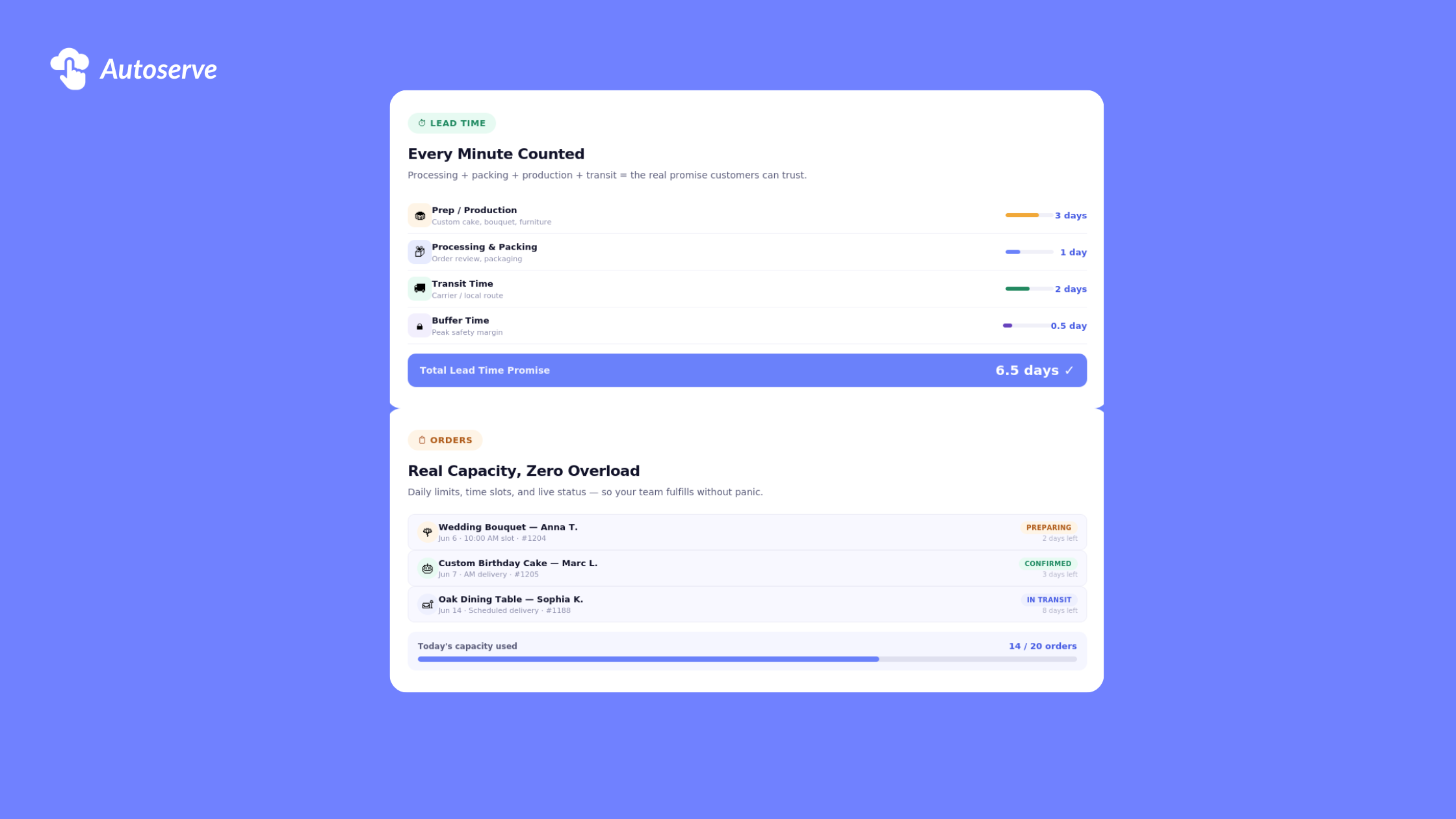
In a Shopify fulfillment workflow, lead time is the operational gap between purchase and customer availability. It includes every task your team must complete before the order can be shipped, delivered, or picked up.
For example, a standard in-stock T-shirt may only need one business day of processing. A custom embroidered hoodie may need five business days. A made-to-order dining table may need three weeks. A birthday cake may need 48 hours and cannot be picked up before 10 a.m.
This is why one storewide shipping rule is rarely enough.
A Shopify merchant should think of lead time as a customer-facing promise, not an internal estimate. If the promise is too short, the team rushes and fails. If the promise is too long, customers may leave. If the promise is unclear, customers contact support before they convert.
These terms often get mixed together, but each one controls a different part of the customer promise.
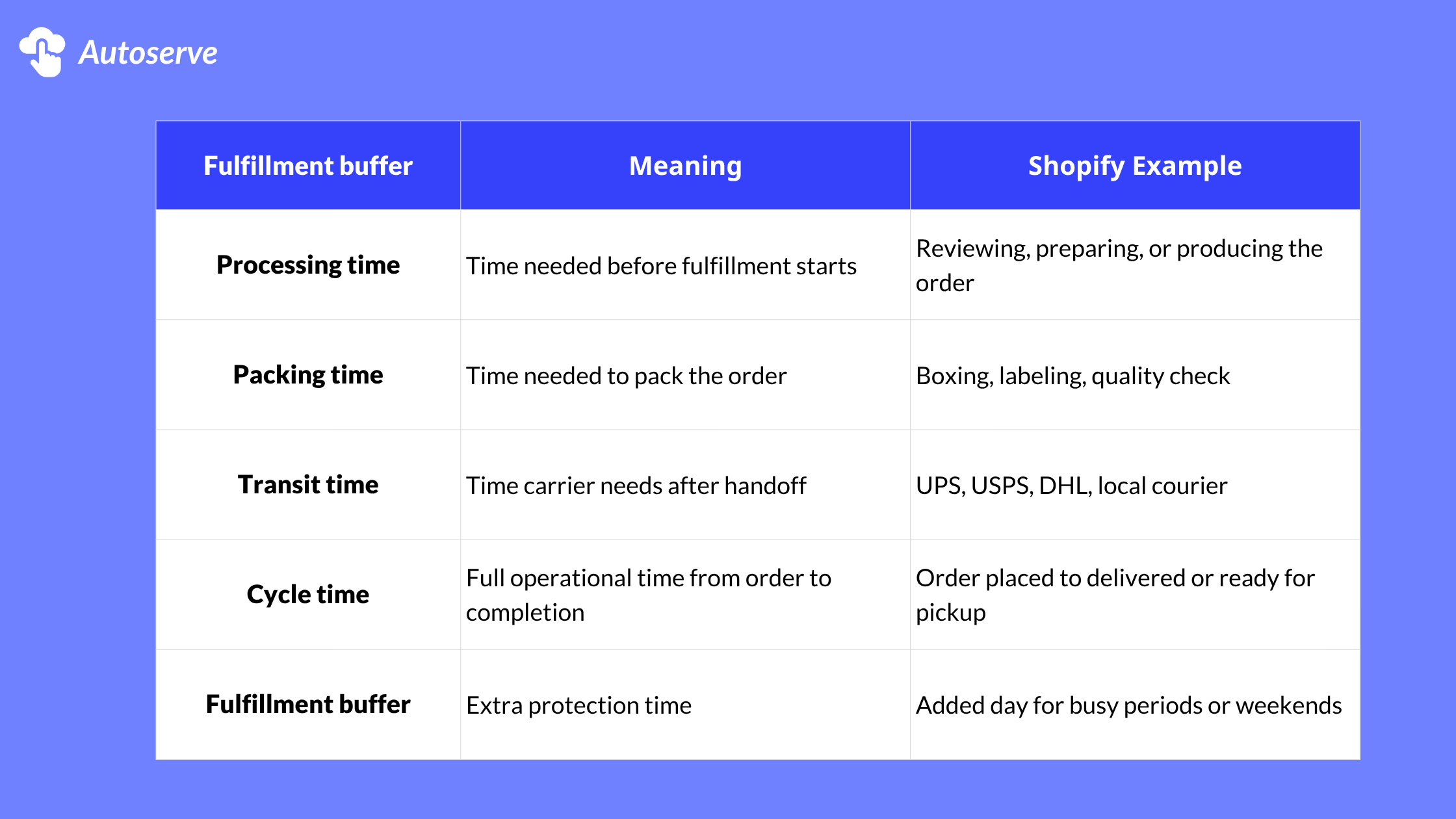
Here is the rule never promise a delivery date based only on the carrier estimate. That ignores your actual prep time.
For example, if UPS takes two days but your team needs three days to prepare the order, the real delivery date is not two days away. It is five days away. If the order is placed after your cutoff time, the lead time may start tomorrow instead of today.
That small detail can decide whether the customer trusts your store.
High-ticket and custom products should not hide long lead times. They should explain them.
This feels counterintuitive. Many merchants fear that showing a longer delivery window will reduce conversion. But for expensive, personalized, or made-to-order products, clarity often improves trust.
A customer buying a $2,000 table is not expecting same-day delivery. A customer ordering a personalized gift understands there is production work. What they need is confidence that the timeline is real.
Use product-level lead time rules for:
A strong setup may show:
“Made to order. Please allow 7–10 business days before shipping.”
A better setup shows:
“Made to order. Select your earliest available delivery date at checkout. Dates are based on our production calendar and current order capacity.”
The second version feels more controlled. It turns waiting into a process.
Most merchants start with a simple question: “How many days should I add before delivery?”
That is the wrong starting point.
The better question is: “What can my team reliably fulfill without breaking the customer promise?”
This is the core difference between basic lead time and capacity-aware lead time. Basic lead time adds a fixed delay. Capacity-aware lead time adjusts the customer’s options based on prep time, cutoff time, available days, blackout dates, time slots, and order volume.
For example, a florist may need one day of prep for regular bouquets but three days for wedding arrangements. A bakery may accept 20 cake orders per day but only 5 custom cakes. A local grocery store may offer same-day delivery before 11 a.m., but next-day delivery after that.
This is why Autoserve’s CX Elevate positioning is relevant. The app focuses on delivery date selection, time slots, cut-off times, daily order limits, and lead time controls for Shopify merchants handling scheduled delivery or pickup.
You can manage lead time with fulfillment time, transit time, product metafields, cutoff rules, delivery date apps, blackout dates, and order capacity limits.
Lead time includes preparation before fulfillment. Transit time is only the time needed after the order is handed to a carrier or delivery team.
Clear lead time can reduce uncertainty and checkout friction. Vague or inaccurate dates can increase cart abandonment and support tickets.
Managing Shopify lead time is not about adding more days to delivery. It is about making your store honest, predictable, and easier to buy from.
When customers see clear dates, valid time slots, and realistic expectations, they feel safer placing the order. When your team has cutoff rules, capacity limits, and blocked dates, they can fulfill without panic.
That is the real win.
A good Shopify lead time setup protects both sides of the transaction. Customers get certainty. Your team gets control. Your store gets fewer support tickets, fewer missed expectations, and stronger conversion confidence.
If your Shopify store relies on local delivery, pickup, custom orders, fresh products, or high-ticket fulfillment, review your lead time rules today. The best delivery promise is not the fastest one. It is the one your team can keep.
You use CX Elevate, update your lead time, blackout dates, and order limits before your next busy sales period. Real capacity fills fast, and customers trust stores that show clear dates before checkout.
We try to make easy and simple for every professionals. Get 30 days free trial - No credit card required.

