🎉 CX Elevate: Date Time Picker is available now on Shopify app store

Shopify app store


Every successful e-commerce entrepreneur in the United States shares a universal nightmare: the overwhelming deluge of a massive sales day.
Imagine this: It’s Mother's Day, or maybe the first day of your biggest holiday promotion. Orders are pouring in faster than you can count, the sales ticker is flashing green, and the initial euphoria is quickly replaced by the cold, sinking feeling of operational dread. Your team is scrambling, your drivers are stuck in traffic, the phone is ringing off the hook, and you realize—with paralyzing clarity—that you've oversold your capacity.
You haven't just created happy customers; you've created a logistical bottleneck, jeopardizing your reputation with every delayed, poorly executed order.
For too long, managing this operational capacity has been a frantic, manual affair—merchants often resort to manually blocking off dates on a calendar or struggling with unwieldy spreadsheet systems. But today, that changes.
We are thrilled to introduce the Order Limit feature in the CX Elevate v.1.1.5 update. This is not just a setting; it's a foundational shift from reactive chaos to proactive, controlled scaling. This new, intuitive, two-tiered system for controlling fulfillment intake defines your maximum bandwidth directly within the app, ensuring you never sacrifice service quality for sales volume again.
In the fast-paced world of digital commerce, efficiency is everything. Yet, when it comes to managing delivery and pickup schedules, many merchants are still using analog solutions for a digital problem.
1. Inaccurate Forecasting: Trying to manually guess your peak capacity based on last year's sales often leads to either underselling (leaving money on the table) or catastrophic overselling.
2. Operational Blind Spots: Manual systems treat all orders the same. They don't account for the fact that delivery capacity is often limited by drivers and fleet size, while pickup capacity is limited by physical space and counter staff.
3. The "Last-Mile" Meltdown: A sudden rush of orders can crash your logistics, leading to massive delays, high customer churn, and poor reviews—ultimately eroding the very brand value you worked so hard to build.
The Order Limit feature in CX Elevate v.1.1.5 was engineered specifically to solve these fundamental flaws by giving you granular, real-time control over your capacity, split by fulfillment type.
The brilliance of the CX Elevate v.1.1.5 update lies in its dual-layered approach to capacity management. It provides a stable baseline for your average operational limits while offering surgical precision for those critical high-demand periods.
The Daily Limits function acts as your default, everyday operational guardrail. This primary layer is found right in the CX Elevate v.1.1.5 Order Limits tab and is the first massive step toward operational clarity: separating capacity by fulfillment method.
.jpg)
This control allows you to set the absolute maximum number of orders your external delivery ecosystem can handle per day.
- Real-World Scenario: If your third-party logistics provider (3PL) or your own driver fleet can reliably manage 150 deliveries daily, you simply set the Order Limit to 150.
- The Automation: Once this 150-order cap is reached, the delivery option for that date is automatically greyed out and becomes unavailable to new customers.
This means you never send more orders into your delivery pipeline than it can process, ensuring timely fulfillment and happy customers.
This separate control defines your internal, in-store capacity.
- Real-World Scenario: If your counter staff and kitchen/prep area can comfortably handle 80 pickup orders without chaos at the counter or long customer wait times, you set the Order Limit to 80.
- The Logic: This control ensures your in-store experience remains smooth, even during rush hour.
The ability to control these limits independently is crucial. For example, the owner of a gourmet pizza shop in Seattle knows their capacity isn't monolithic. Their ability to deliver is limited by the number of drivers available, but their ability to handle pickups is limited by their oven space. CX Elevate v.1.1.5 respects these distinct logistical constraints, providing a powerful and tailored solution. This intelligent baseline control ensures that even on a standard Tuesday, you won't accidentally overbook and compromise the quality of your service.
While the daily limit handles the average workload with stability, certain high-demand periods demand surgical precision. Think of Thanksgiving, Valentine’s Day, Mother’s Day, or even a localized city event. These days require the flexibility to override the baseline limits, and this is where the Specific Date Limits functionality in CX Elevate v.1.1.5 truly shines.
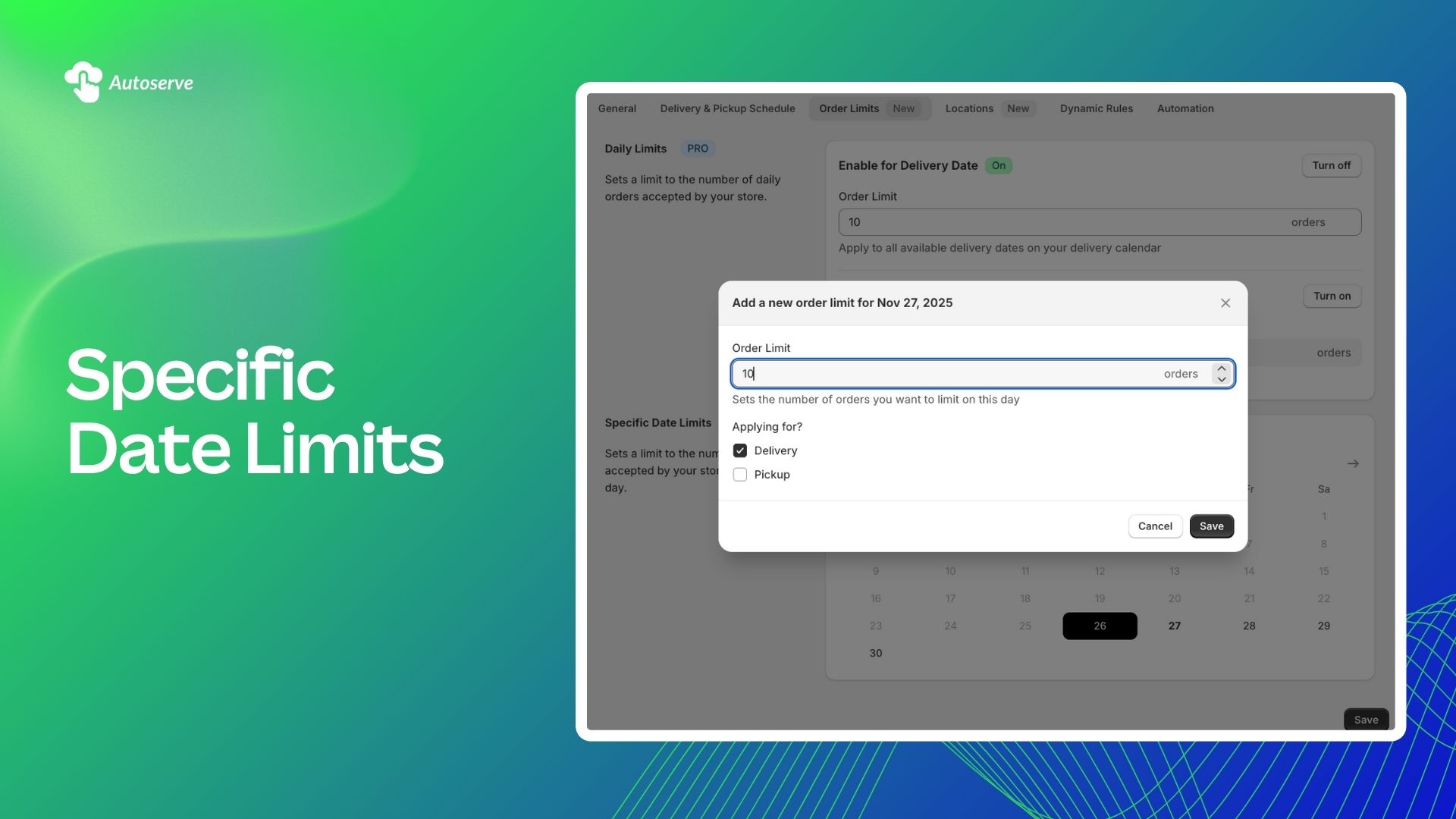
As you view the calendar interface, you can easily click a specific date—like November 27, 2025—to instantly override the baseline Daily Order Limit.
Upon clicking a date, a concise pop-up appears, offering three critical controls:
1. Set a Custom Order Limit: You can dynamically adjust the capacity for this single date. This might involve boosting your limit for a major holiday (e.g., increasing from 100 to 200 orders for a major sales day) or drastically reducing it for a planned maintenance day or a known slow period (e.g., setting the limit to 20 or even 0).
2. Specify Application: Crucially, you can apply this specific custom Order Limit to Delivery, Pickup, or Both fulfillment types.
3. Targeted Override: This feature allows you to fine-tune your logistics based on real-world constraints.
Consider a high-volume floral shop in Boston preparing for Valentine's Day. They estimate they can manage 500 total orders, but their logistical reality is segmented.
- Due to limited access to delivery drivers, they might set a specific Order Limit of 300 for Delivery.
- To manage the inevitable heavy foot traffic and queue lines, they set a specific Order Limit of 200 for Pickup.
This level of granular control—managing capacity by date and by fulfillment type—housed simply within the calendar interface, represents a massive leap forward in e-commerce logistics management delivered by CX Elevate v.1.1.5.
The benefit of implementing a smart Order Limit system goes far beyond convenience. It directly impacts your bottom line, customer satisfaction, and long-term scalability. Data consistently shows that overbooking is a primary driver of customer churn.
.jpg)
This data illustrates a fundamental truth: The highest sales day is only a true success if the fulfillment is flawless. By introducing a definitive Order Limit, you trade the risk of revenue-destroying bottlenecks for the guarantee of service excellence.
"Scaling is often mistaken for just increasing sales," says Sarah Chen, an e-commerce operations consultant. "But true scaling is about increasing sales without increasing operational risk. Systems like the CX Elevate Order Limit feature are essential because they introduce smart boundaries. They allow a business to push marketing aggressively, secure in the knowledge that the logistics system will automatically self-regulate when capacity is reached. This is intelligent growth."
The launch of the Order Limit feature in CX Elevate v.1.1.5 is part of a larger, global shift toward Capacity-Aware Commerce.
While the Order Limit provides the necessary guardrails, its true power will be realized when integrated with other automation tools. Imagine coupling this feature with a platform like Shopify Flow.
Hypothetical Shopify Flow Workflow:
- Trigger: The specific Order Limit for "Delivery" on December 24th is reached.
- Action: Automatically notify the Facebook Ad Campaign manager to pause all delivery-focused holiday ads.
- Action 2: Automatically update a notification banner on the website that says, "Delivery slots for December 24th are now fully booked."
This automated synergy is where e-commerce becomes truly effortless and scalable. The Order Limit is the data point, and automation is the action taken.
Some merchants initially worry that setting an Order Limit is self-sabotaging—won't it limit revenue?
The answer is a resounding No. Limiting orders strategically actually protects long-term growth. Selling 250 orders on a day when you can only handle 200 results in 50 late, compromised, or canceled orders, which translates into:
- Negative reviews.
- Increased customer service costs.
- Lost repeat business.
- A tarnished brand image.
Conversely, selling 200 perfectly fulfilled orders maximizes short-term revenue and guarantees five-star experiences, building lifetime customer value. The Order Limit is not a cap on ambition; it's a foundation for sustainable profitability.
The days of manual capacity management are over. Autoserve’s CX Elevate v1.1.5 gives you precise tools to operate with confidence and scale smart. With dual-layered Order Limits—daily caps and date-specific controls—you’re safeguarded against fulfillment chaos. Don’t let overbooking fears hold back your marketing. Embrace controlled capacity and fulfill with the consistency your U.S. customers expect. When the next big sales day comes, you won’t feel panic—you’ll feel peace, knowing CX Elevate by Autoserve is silently keeping everything in sync.
We try to make easy and simple for every professionals. Get 30 days free trial - No credit card required.

