🎉 Calla - Delivery & Pickup Date is available now on Shopify app store

Shopify app store


It’s the Tuesday before Mother’s Day, and your Shopify store is exploding with orders. Revenue is spiking, but the fulfillment floor tells a different story: 45 deliveries scheduled for one driver, zero pickup slots despite a full staff, and holiday overtime eating your margins because of flat-rate pricing.
You aren’t scaling; you’re drowning.
True growth isn't just about order volume—it's about controlling the "when" and "how." That is exactly why we built Calla v1.1.6. Far more than a minor patch, this update introduces precision capacity control, allowing you to align digital sales with physical reality.
In this guide, we’ll show you how Calla v1.1.6 helps you protect your bottom line while delivering a flawless customer experience.
Traditional apps forced merchants into rigid weekly schedules that ignored real-world logistics. Whether you only rent a delivery van on Tuesdays or need longer lead times for weekend pickups, mismatched availability leads to costly refunds and apologies. Calla v1.1.6 dismantles this rigidity, transforming your Shopify store into a sophisticated logistics manager with granular control that actually mirrors your physical operations.
When we talk about "granularity" in logistics, we mean the ability to make specific rules for specific scenarios. Without it, you are forced to use the "lowest common denominator" setting.
For example, if you can deliver every day except Sunday, but you can do pickups on Sunday, legacy systems forced you to mark Sunday as "Closed" for everyone, just to prevent delivery orders. You lose the pickup revenue just to avoid the delivery headache.
With Calla v1.1.6, that compromise is gone.
The true power of this update lies in its dual-engine flexibility. We understand that how you ship a product and how you hand it over at the counter are two different worlds, and your scheduling should reflect that.
- Independent Toggle Control: You have the absolute freedom to activate Delivery Time Slots, Pickup Time Slots, or both simultaneously depending on your business model.
- Mass Sync or Granular Customization: Use the "Apply to all days" toggle to set a consistent weekly rhythm in one click, or uncheck it to craft unique schedules for specific days—perfect for those busy weekends or shorter Fridays.
- Precision Interval Seating: Define your Slot Duration with surgical accuracy - choose 15 or 30 minutes for rapid turnarounds, or 1 to 4 hours for more complex logistics.
- Automated Capacity Safeguards: For every configuration, you can enforce a strict Order Limit. This acts as your digital gatekeeper, automatically closing off time windows once your capacity is reached to ensure your team never feels the burn of overbooking.
By treating Delivery and Pickup as distinct entities with their own rules, Calla transforms your checkout into a high-performance logistics hub that works for your team, not against it.
.png)
Let’s talk about money. Specifically, the hidden costs of peak-time fulfillment.
It is a well-known statistic in the logistics industry that "last-mile" delivery costs can increase by up to 50% during holidays due to driver scarcity and overtime pay. If you are charging a flat $10 delivery fee on Christmas Eve, you might actually be losing money on every order.
Calla v1.1.6 introduces a revamped surcharge engine designed to help you recover these costs dynamically.
.png)
.png)
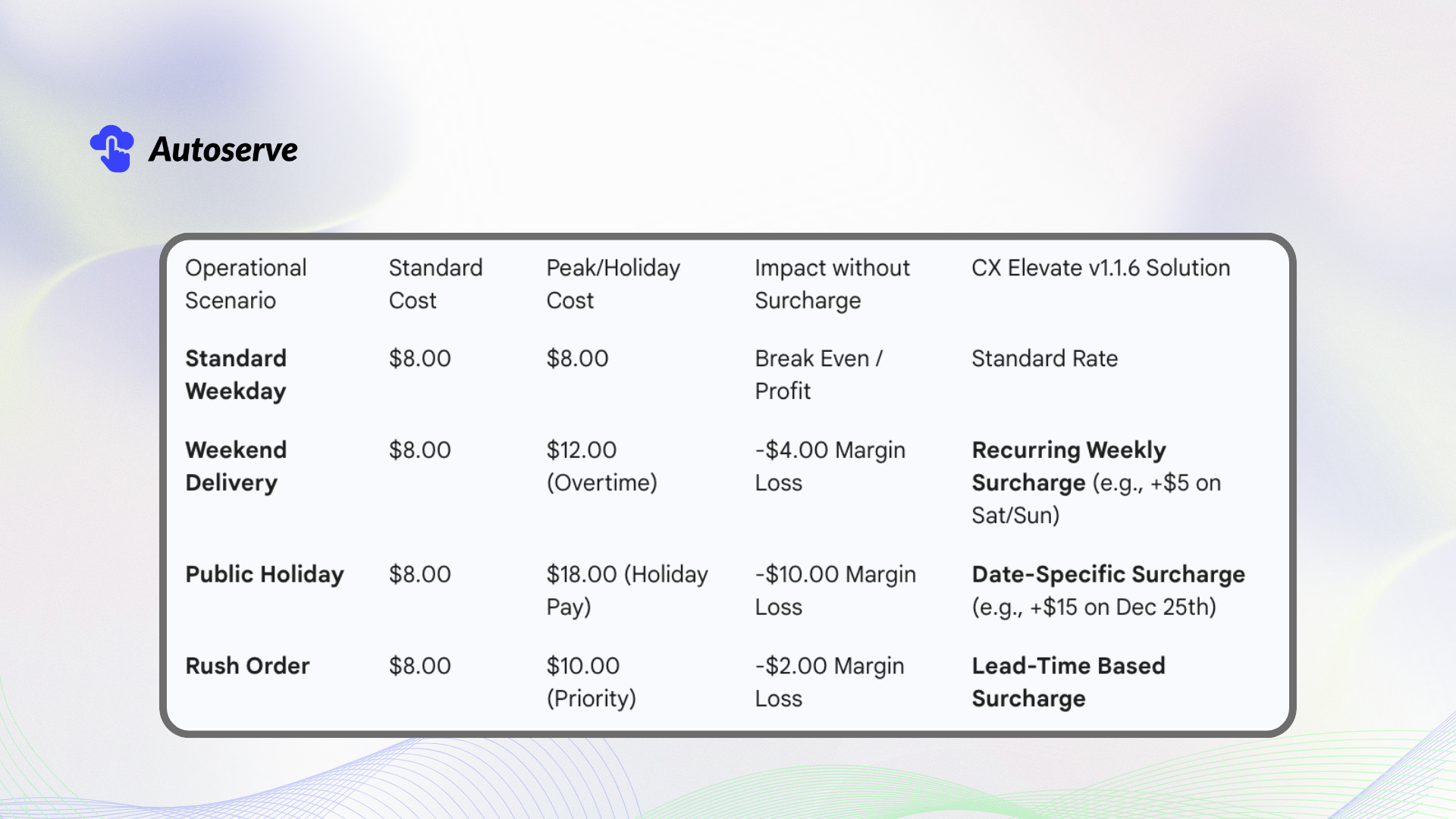
Below is a breakdown of how operational costs fluctuate and how the new surcharge features can neutralize that variance.
The new update gives you two layers of control:
1. Weekly Patterns: You can now set a rule that says, "Every Saturday and Sunday, add a $5 surcharge." You set this once, and it runs on autopilot. This is perfect for recouping weekend labor costs.
2. Date-Specific Surcharges: This allows you to target the calendar. If you know that Valentine's Day requires you to hire temporary drivers, you can add a $15 surcharge specifically for orders selected for February 14th.
This ensures that the customers who demand the most expensive service slots are the ones paying for the privilege, keeping your base prices competitive for everyone else. Calla v1.1.6 makes this setup intuitive, moving away from complex workarounds.
Fulfilling orders with accuracy starts with a realistic timeline. Lead Time (Processing Buffer Time) is now more robust in v1.1.6, ensuring your team never feels rushed and your customers always receive clear expectations. We’ve expanded how lead times are calculated and where they appear, providing a seamless experience from the product page to checkout.
- Decoupled Fulfillment Logic: You can now configure independent Lead Times for Delivery and Pickup to reflect your actual production speed for each method.
- Intelligent Day Counting: Choose how your buffer is calculated - either by All days or Business days only (Mon–Fri)—to prevent orders from piling up while you’re closed.
- Apply Settings to Extensions: Your settings now sync consistently across the Cart Drawer, Cart Page, Product Page, and Checkout UI (for Shopify Plus), eliminating conflicting dates.
A common challenge for merchants is requiring a strict notice period, such as "at least two days from today". Previously, merchants tried to approximate this with complex cut-off settings.
Now, you can simply set Lead Time = 2 days. The system automatically calculates the earliest available date based on your processing buffer, ensuring customers can only select dates you are actually prepared to fulfill. This ensures your operations stay protected while maintaining a transparent "Earliest Available Date" for every buyer.
.png)
In the past, if you set a "2-day lead time," and a customer ordered on Friday night, the system would count Saturday (Day 1) and Sunday (Day 2), telling the customer their order would be ready Monday morning.
But if your bakery is closed on weekends, no one is baking. You come in Monday morning to find an order due... Monday morning.
Calla v1.1.6 introduces the option to count Lead Time by Business Days Only.
If you enable this setting, that same Friday night order sees Saturday and Sunday skipped. The system counts Monday (Day 1) and Tuesday (Day 2). The earliest date the customer can pick is Wednesday.
This prevents the panic of walking into a backlog of "overdue" orders that accumulated while you were sleeping.
Another frustration for merchants has been inconsistent messaging. A customer sees one date on the product page, adds the item to the cart, and then sees a different date in the checkout. This causes abandonment.
Calla v1.1.6 has expanded its "Apply Settings to Extensions" support. Whether the customer is interacting with a Cart Drawer, the main Cart page, a Product page widget, or the Checkout UI (for Shopify Plus merchants), the logic remains consistent.
If you require 2 Business Days lead time, that rule is enforced everywhere. This seamless integration builds trust. When a customer sees a delivery date, they can believe it.
It is important to address a potential counter-argument. With all these new toggles—Delivery vs. Pickup, Business Days vs. All Days, Date-Specific Surcharges—is the app becoming too difficult to manage?
There is a valid concern in software design known as "feature creep." Does adding more options just confuse the user?
While Calla v1.1.6 definitely adds more distinct settings, the trade-off is necessary for scaling businesses. A simple "on/off" switch is fine for a hobbyist selling five items a week. But for a business handling hundreds of local deliveries, simplicity often equals lost revenue.
To mitigate complexity, the Calla v1.1.6 update includes a redesign of the setup UI. It uses clear banners and flags (like the new Pickup flag option in location lists) to guide you.
Think of it like the cockpit of an airplane versus the dashboard of a car. The airplane has more buttons because it operates in a more complex environment (three dimensions vs. two). If you want to fly—if you want to scale—you need those controls.
Beyond the major features, Calla v1.1.6 includes several "Quality of Life" improvements that make the day-to-day management of the app smoother.
Mobile commerce is dominant. In the US, over 70% of Shopify traffic comes from mobile devices. Previous versions of many scheduling apps struggled with the native iOS date picker, sometimes preventing customers from selecting "Same Day" delivery even when it was enabled.
Calla v1.1.6 has patched this specific interaction, ensuring that iPhone users have a frictionless experience. This might seem minor, but if 10% of your mobile users bounce because they can't select a date, that is a massive hit to your bottom line.
The update also bolsters the backend logic for Dynamic Rules. This includes consistency for order limits (e.g., "Maximum 20 deliveries per day") and specific rules for Gift Cards. Ensuring that digital products like Gift Cards don't trigger physical delivery slots is a small detail that saves massive operational headaches.
So, you’ve installed Calla v1.1.6. What should you do first? Here is a strategic checklist to ensure you are getting the most out of the update.
1. Audit Your Margins: Look at your delivery costs for the last 6 months. Did you lose money on weekends? If so, immediately go to the Surcharges section and set up a recurring weekend fee.
2. Review Your "Dark Days": Do you have days where you are open but not fulfilling orders? Go to Time Slots v2 and configure your Delivery schedule to match your driver’s actual availability, independent of your store hours.
3. Check Your Lead Time: If you don't work weekends, switch your Lead Time setting to "Business Days Only." This is the single easiest way to reduce stress for your production team.
4. Test the Cart Drawer: Go to your storefront as a customer. Add items to the cart and open the drawer. Ensure the dates offered match your new settings. The improved theme compatibility in Calla v1.1.6 should make this seamless, but always verify.
We are currently witnessing a shift in consumer expectations. Two-day shipping is no longer the gold standard; scheduled arrival is.
Customers don't just want it "fast"; they want it "convenient." They want to know that the flowers will arrive between 2 PM and 4 PM on Saturday because that’s when the recipient is home. They want to know they can pick up the catering order at 10 AM sharp on Sunday.
Precision is the new currency of trust.
By utilizing tools like Calla v1.1.6, you are doing more than just organizing your calendar. You are making a promise to your customer that you can keep.
The improvements in lead time logic and storefront consistency mean that when a customer commits to a purchase, they are doing so with accurate information. This reduces the "Where is my order?" (WISMO) tickets that plague support teams.
The release of Calla v1.1.6 is a clear signal that the tools for local delivery and pickup are maturing. We are moving past the experimental phase of local commerce and into the professional phase.
The "one-size-fits-all" schedule is a relic of the past. Today, successful merchants demand—and require—precision.
Whether you are a florist protecting your Valentine's Day margins, a bakery ensuring your dough has time to rise, or a furniture store coordinating limited delivery trucks, this update speaks your language.
Take control of your calendar. Protect your margins. And most importantly, stop letting your logistics run you.
Are you ready to optimize your delivery strategy? Review your Time Slots and Surcharge settings in Calla today.
We try to make easy and simple for every professionals. Get 30 days free trial - No credit card required.

