🎉 Calla - Delivery & Pickup Date is available now on Shopify app store

Shopify app store


Let’s tell a story many retail owners know too well.
Your store looks busy. Customers are walking in. Online orders are coming through. Staff are helping people at the counter. Someone just bought the last item in store, but your website still says it is available. Another customer wants to pick up an online order, but your team cannot find the exact stock location. At the end of the day, sales look fine, but your numbers still feel messy.
The problem is not your products. It is not your staff. It is not even your marketing.
The problem is your retail system.
Many stores still operate like two separate businesses: one online and one offline. The ecommerce store has its own orders. The physical store has its own checkout. Inventory updates are delayed. Customer data is incomplete. Reports do not tell the full story. At first, this feels manageable. As the business grows, it becomes a hidden tax on time, trust, and profit.
This is why Shopify POS matters.
Shopify POS is not just a way to take payments in person. It is a retail command center that connects your store, ecommerce site, inventory, customer profiles, staff workflows, and reporting inside one commerce ecosystem. For modern retail stores, especially specialty stores, boutiques, pet shops, hobby stores, aquarium shops, and growing ecommerce brands opening physical locations, that connection can change how the business runs.
The real question is not, “Can Shopify POS process payments?”.
The better question is, “Can your current retail system help you grow without creating more chaos?”.
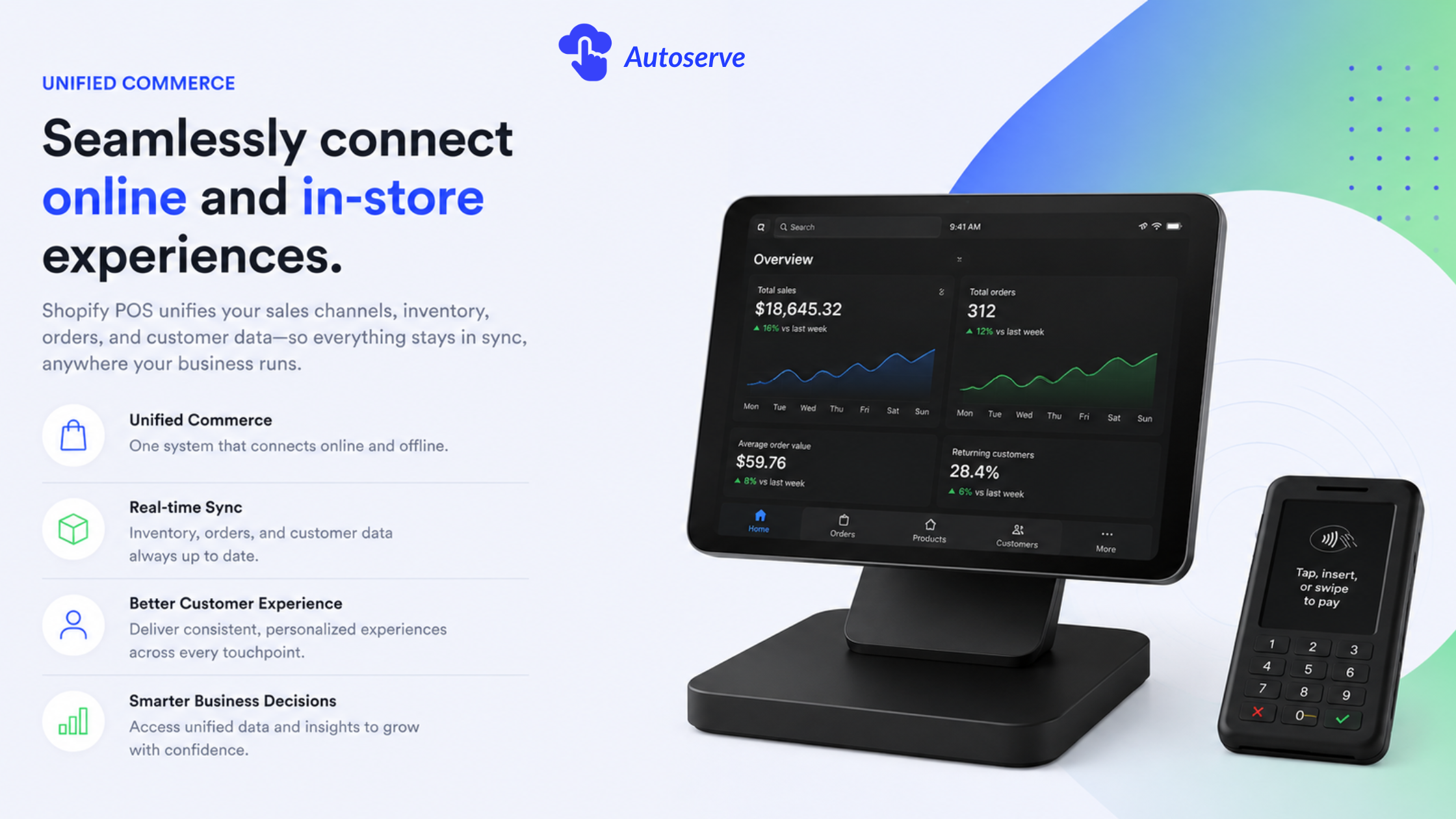
Retail stores should use Shopify POS when they need more than a basic cash register. A basic POS can process payments. Shopify POS helps retailers connect sales, inventory, customers, staff, locations, and ecommerce activity in one system.
This shift matters because modern customers do not think in channels. They may discover a product on Instagram, check the website, visit the store, ask staff a question, leave without buying, and return online later. If your retail system only records the in-store sale, you miss the full customer journey.
Shopify POS helps close that gap. Shopify describes POS as a system for selling in person while managing orders, inventory, and customers across retail locations and the online store.
The real value is not only faster checkout. The real value is operational clarity.
A basic cash register records what already happened. A connected POS helps you understand what is happening now. That is the difference between running a store from memory and running it from real data.
For specialty retail stores, this can be a major advantage. Aquarium shops, pet stores, hobby stores, collectible stores, and boutiques often deal with changing stock, repeat buyers, and high-touch service. These stores need more than a transaction tool. They need customer memory, inventory confidence, and a system that can grow with them.
Shopify POS connects online and in-store sales by keeping both channels inside the Shopify commerce ecosystem. Instead of treating your ecommerce store and retail store as separate operations, Shopify POS helps both sides share the same product, order, inventory, and customer data.
For example, imagine a boutique sells the last medium-size jacket inside the store. Without a connected system, the website may still show that jacket as available. A customer buys it online, then your staff has to cancel the order. That mistake costs time, trust, and future sales.
With Shopify POS, in-store sales can update inventory inside Shopify. Shopify’s inventory documentation says merchants need to activate inventory tracking and assign inventory to locations to help prevent overselling and monitor stock at each location.
This is why Shopify POS is useful for buy online, pick up in store, ship to customer, local delivery, pop ups, and multi-location retail. It gives the business one clearer view of what was sold, where it was sold, and what is still available.
Shopify POS solves the problems that appear after a store starts growing. At first, a basic POS may feel enough. It takes payments. It prints receipts. It tracks daily sales. But once the business adds ecommerce, events, staff, multiple locations, or repeat marketing, basic systems often become limiting.
The most common problems include:
Here is the uncomfortable truth: the cheapest POS can become the most expensive system.
A low monthly fee looks good at first. But if the system creates manual work, stock errors, weak reporting, and disconnected customer data, the real cost is much higher. Shopify POS is stronger when the business needs a retail operating system, not just a payment terminal.
Shopify POS improves inventory management by helping retailers keep online and in-store stock connected. This is one of the biggest reasons retail stores consider Shopify POS. Inventory mistakes are expensive. They cause canceled orders, poor customer service, refund work, and bad reviews.
In retail, inventory accuracy is customer trust.
When your website says an item is available, customers believe you. When a staff member says a product is in stock, customers expect it to be true. If your system is wrong, trust drops. Shopify POS helps reduce that risk by connecting sales activity with inventory tracking inside Shopify.
This is important for stores with many SKUs, variants, or fast moving products. A pet store may sell food, toys, medication, and accessories. An aquarium shop may sell live fish, tanks, tools, and water care products. A collectible store may sell rare items that cannot easily be replaced.
For these businesses, inventory is not just a back-office task. It is part of the customer experience.
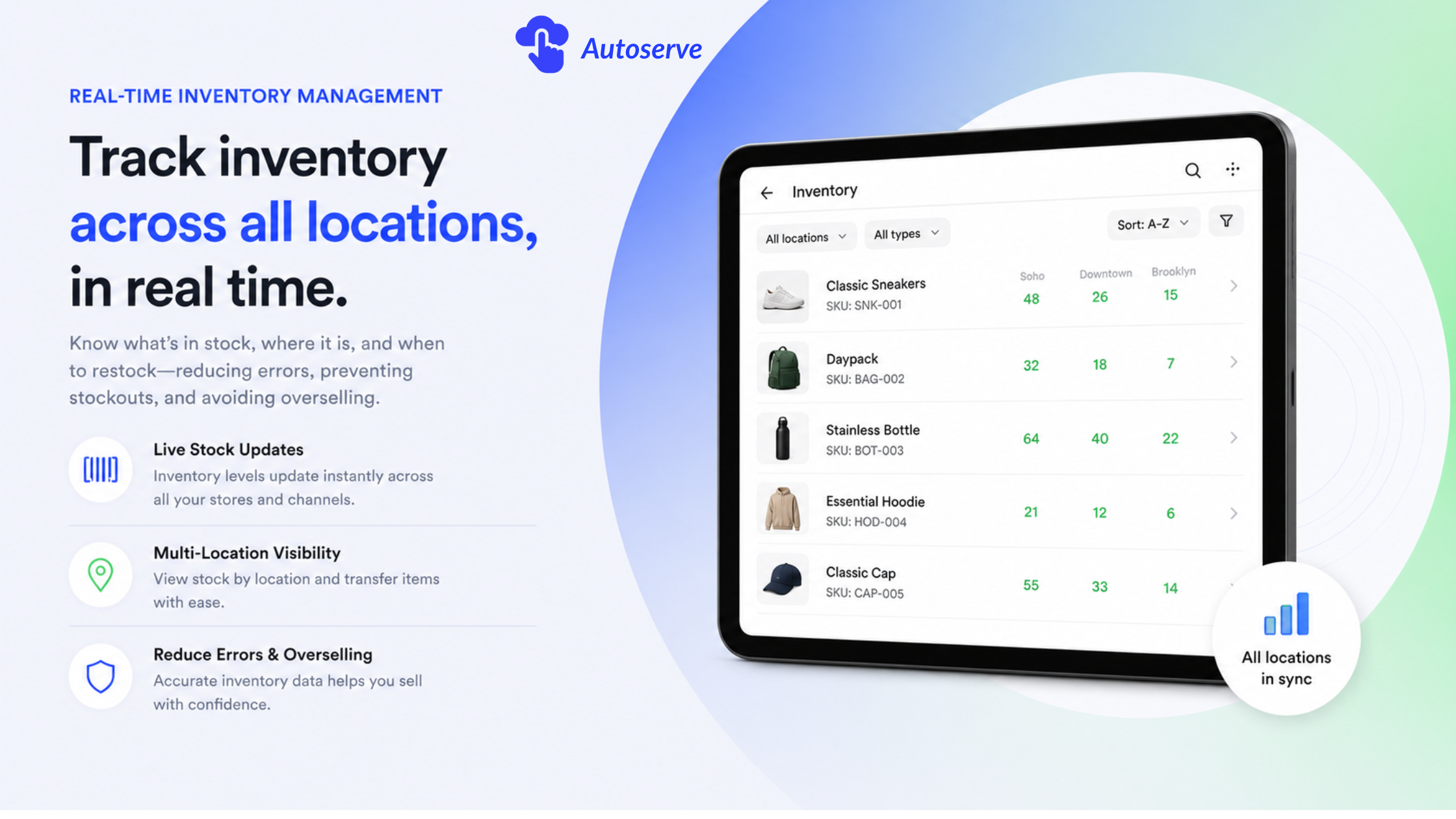
Real-time inventory sync helps prevent overselling by updating stock as products are sold, returned, transferred, or adjusted.
This reduces the chance that one item is sold twice across different channels.
This helps staff make better decisions during checkout. It also helps owners plan purchasing with more confidence.
Overselling may sound like a small mistake, but it can hurt a retail brand quickly. A customer who buys a product online expects the order to be real. If the store cancels later because the item was already sold in person, that customer may not return.
Shopify POS helps protect that promise by keeping inventory closer to real time.
Shopify POS is useful for stores with many SKUs, variants, or locations because complexity grows fast. A boutique may sell one product in many sizes and colors. A hobby store may carry parts, kits, tools, and limited-edition products. A pet store may sell food by size, flavor, brand, and life stage.
When product data is messy, staff waste time searching. When inventory is unclear, customers get poor answers. When each location tracks stock differently, owners cannot see what is really happening.
Shopify POS helps by connecting retail checkout with Shopify’s product and inventory system. If the business has more than one location, inventory can be assigned and tracked by location. This supports better store operations, local pickup, transfers, and stock planning.
It also helps with retail analytics. Instead of only asking, “How much did we sell?” the owner can ask better questions. Which products move fastest in-store? Which items sell better online? Which location needs more stock? Which categories deserve more promotion?
Shopify POS is a strong choice for specialty retail stores because these businesses depend on product knowledge, customer relationships, and repeat purchases. They are not only scanning items at checkout. They are guiding customers, solving problems, and building long term trust.
Specialty retail includes aquarium shops, pet stores, hobby stores, collectible shops, boutiques, gift shops, beauty stores, and niche lifestyle retailers. These businesses often sell products that are unique, seasonal, rare, fast-moving, or hard to reorder.
That makes flexibility important.
This is where Shopify POS becomes more than a checkout system.
A basic POS forgets the customer after the receipt prints. Shopify POS helps the store remember who bought, what they bought, and what they may need next.
For specialty stores, that memory can drive retention.
Shopify POS helps specialty stores by turning in-store purchases into useful customer and product data. That matters because specialty buyers often return for related products.
An aquarium customer may buy fish today, then return for food, water care, filters, plants, or tank upgrades. A pet customer may come back monthly for food and supplies. A hobby customer may need parts, refills, tools, or accessories. A boutique shopper may want early access to new arrivals.
If these purchases are connected to customer profiles, the store can create better follow-up campaigns. Staff can view purchase history. Marketing teams can segment repeat buyers. Owners can understand which products create long term value.
This gives specialty retailers a stronger base for email marketing, loyalty programs, VIP customer lists, and personalized service.
The hidden advantage is simple: Shopify POS can make the physical store part of the marketing system. Every in-store sale can help the business understand the customer better.
Flexible inventory matters because specialty stores often do not sell predictable products. Some items arrive in small batches. Some products are one-of-a-kind. Some stock moves quickly because of seasonality, trends, or scarcity.
For example, a collectible store may receive a rare product that will never be restocked. An aquarium shop may receive live inventory that changes weekly. A boutique may sell limited styles that disappear once a size sells out.
In these cases, slow or disconnected inventory creates real risk. Staff may promise products that are no longer available. Online customers may buy items already sold locally. Owners may reorder the wrong products because reports are incomplete.
Shopify POS supports more flexible retail operations because in-store selling connects back to Shopify. Staff can process transactions, attach customers, manage product information, and keep sales activity tied to the larger commerce system.
This gives the business more control over scarce products, fast-moving items, and repeat purchase opportunities.
Shopify POS is good for growing retail stores when the business needs a system that can start simple and scale over time. A retailer may begin with one store, one tablet, and one card reader. Later, the same business may add barcode scanners, receipt printers, staff permissions, multiple locations, advanced inventory workflows, loyalty tools, and retail reporting.
This staged growth is valuable. Many small and mid-sized retailers do not want to overbuild at the beginning. They need a lean setup now, but they do not want to replace everything later.
The best time to think about a stronger POS system is before growth creates chaos.
If a store waits until staff are overwhelmed, inventory is unreliable, and reports are messy, the migration becomes harder. A connected retail system gives growing stores a cleaner foundation before the next growth stage.
The retail businesses that benefit most from Shopify POS usually share one trait: they want online and offline sales to work together.
Shopify POS is a strong fit for:
It may be less ideal for a business that only needs the cheapest way to take in-person payments and has no ecommerce plan. In that case, a simpler POS may be enough.
But once the business needs inventory accuracy, customer profiles, local pickup, ship-to-customer, staff permissions, and connected reporting, Shopify POS becomes much more strategic.
The real question is not, “Do we need a POS?”.
The better question is, “Do we need one system that can support how customers actually shop today?”.
A store should consider upgrading from POS Lite to POS Pro when basic in-person selling is no longer enough. Shopify lists POS Pro as the upgrade for retail locations and prices it at $89 USD per month per location. It is designed for businesses selling from a permanent retail location.
POS Lite can be enough for simple selling, pop ups, and early-stage in-person sales. POS Pro makes more sense when retail operations become a serious part of the business.
The decision should be based on workflow needs, not just price. If the store saves staff time, reduces errors, improves customer records, and supports better reporting, POS Pro may pay for itself through cleaner operations.
Shopify POS cost depends on the Shopify plan, whether you use POS Pro, hardware needs, payment processing, and any apps or setup support. This is where many retailers make a mistake. They compare only the monthly POS fee and ignore total cost of ownership.
Shopify’s official pricing page lists POS Pro at $89 USD per month per location. It also explains that retailers still need a Shopify plan and should consider other costs tied to their setup.
A simple example:
If a retailer uses POS Pro at two locations, the POS Pro add-on alone would be:
2 locations × $89 = $178/month
That does not include the Shopify ecommerce plan, hardware, payment processing, apps, training, or setup work.
This does not mean Shopify POS is expensive or cheap by default. It means retailers should compare the full operating cost, not just the subscription price.
A cheaper POS may look better on paper. But if it creates manual reconciliation, inventory mistakes, and weak customer data, the business may pay in other ways.
The main Shopify POS costs usually fall into four groups: software, hardware, payment processing, and setup.
Retailers should consider hidden costs such as product data cleanup, SKU setup, barcode labels, staff training, hardware testing, migration, tax rules, return workflows, reporting setup, and third-party apps.
The biggest hidden cost is not always software. It is confusion.
If product names are unclear, staff search too long during checkout. If inventory is assigned to the wrong location, customers may see incorrect stock. If staff permissions are too open, mistakes can happen. If no one captures customer data at checkout, the business loses future marketing value.
A strong Shopify POS launch should include:
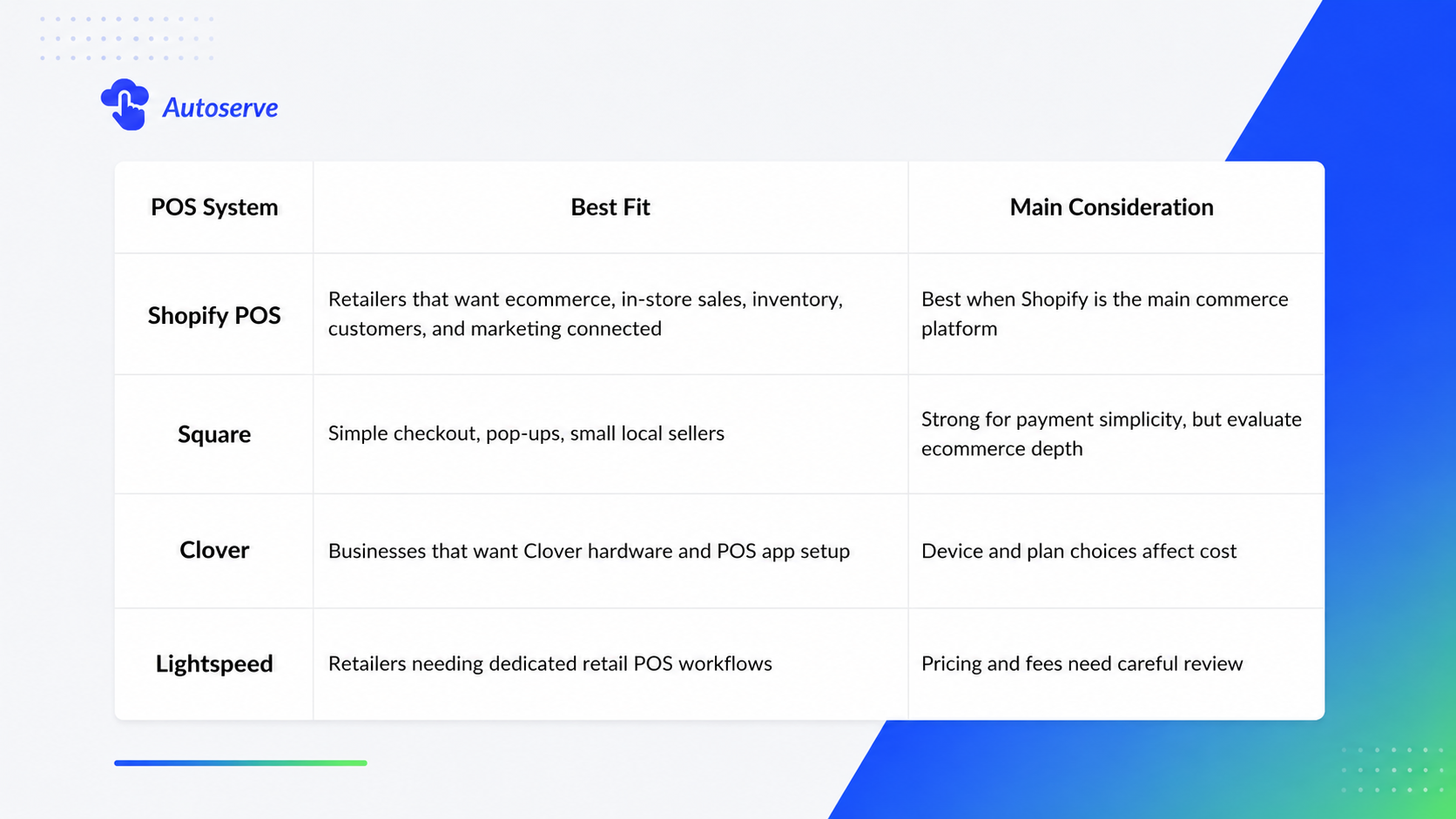
Shopify POS, Square, Clover, and Lightspeed can all support in-person selling. The better question is which system fits the business model.
Shopify POS is strongest when a retailer wants ecommerce, in-store checkout, inventory, customer profiles, and marketing to work together. Square is often attractive for simple in-person selling because Square lists a free retail plan where sellers pay processing fees when they take payments. Clover focuses on POS devices, apps, and plans that businesses can configure based on their needs. Lightspeed is a retail POS platform with pricing that can vary by business and industry, with additional fees possible.
The goal is not to say one POS is best for everyone. The goal is to match the system to the store’s growth path.
Retailers should prepare their products, inventory, staff, locations, hardware, customer capture workflow, and reporting goals before launching Shopify POS. A good launch is not only about downloading the app. It is about designing how the store will operate.
Start with product data. Clean product titles, variants, SKUs, prices, tax rules, and barcodes. Then prepare inventory. Stock should be assigned to the right locations so the system can reflect what is available in each place. Shopify’s inventory guidance says merchants need to assign inventory to locations to monitor stock at each location.
Next, prepare staff workflows. Decide who can discount, refund, adjust inventory, create custom sales, and access reports. A growing retail store should not give every team member the same level of access.
Finally, prepare the customer experience. Decide whether staff should ask for email at checkout. Decide how you will use customer profiles. Decide what happens when a customer wants pickup, exchange, return, or ship-to-home service.
Retailers should avoid treating Shopify POS as a simple payment tool. That mindset leads to poor setup.
Common mistakes include:
Another mistake is waiting too long to fix the system. Many retailers only upgrade after operations become painful. By then, the business may already have messy data, frustrated staff, and unhappy customers.
The smarter move is to build the retail foundation before growth exposes every weak point.
AutoServe can help retail stores plan Shopify POS around real business workflows, not just software installation. That includes product data, inventory structure, POS hardware, staff permissions, customer capture, local pickup, reporting, and marketing integration.
This matters because Shopify POS is only as strong as the setup behind it. A clean system helps staff move faster. A good inventory structure reduces errors. Strong customer profiles support better marketing. Clear reporting helps owners make better decisions.
For specialty retailers, the opportunity is even bigger. Aquarium shops, pet stores, hobby stores, collectible stores, and boutiques can use Shopify POS to connect product knowledge, customer relationships, and repeat purchase behavior.
If your retail business is preparing for more traffic, more online orders, more staff, or more locations, do not wait until the workflow breaks. Build the system before the pressure arrives.
Ready to turn your store from scattered tools into a connected retail command center? Talk to AutoServe and plan your Shopify POS setup before your next growth stage.
Yes. Shopify POS can support multi-location retail when inventory, products, staff, and locations are configured correctly inside Shopify.
Yes, if the store wants connected online and in-store sales, better inventory accuracy, customer profiles, and room to grow. If the store only needs simple payments, a lighter setup may be enough.
Yes. Shopify POS customer profiles can store contact details, purchase history, and preferences, which can support better marketing, personalization, and repeat sales.
We try to make easy and simple for every professionals. Get 30 days free trial - No credit card required.

